Version 2.2.2-incubating
Copyright © 2004, 2006 International Business Machines Corporation
Copyright © 2006, 2008 The Apache Software Foundation
Incubation Notice and Disclaimer. Apache UIMA is an effort undergoing incubation at the Apache Software Foundation (ASF). Incubation is required of all newly accepted projects until a further review indicates that the infrastructure, communications, and decision making process have stabilized in a manner consistent with other successful ASF projects. While incubation status is not necessarily a reflection of the completeness or stability of the code, it does indicate that the project has yet to be fully endorsed by the ASF.
License and Disclaimer. The ASF licenses this documentation to you under the Apache License, Version 2.0 (the "License"); you may not use this documentation except in compliance with the License. You may obtain a copy of the License at
Unless required by applicable law or agreed to in writing, this documentation and its contents are distributed under the License on an "AS IS" BASIS, WITHOUT WARRANTIES OR CONDITIONS OF ANY KIND, either express or implied. See the License for the specific language governing permissions and limitations under the License.
Trademarks. All terms mentioned in the text that are known to be trademarks or service marks have been appropriately capitalized. Use of such terms in this book should not be regarded as affecting the validity of the the trademark or service mark.
April, 2008
Table of Contents
- 1. Overview
- 2. UIMA Conceptual Overview
- 3. Eclipse IDE setup for UIMA
- 4. UIMA FAQ's
- 5. Known Issues
- Glossary
The Unstructured Information Management Architecture (UIMA) is an architecture and software framework for creating, discovering, composing and deploying a broad range of multi-modal analysis capabilities and integrating them with search technologies. The architecture is undergoing a standardization effort, referred to as the UIMA specification by a technical committee within OASIS.
The Apache UIMA framework is an Apache licensed, open source implementation of the UIMA Architecture, and provides a run-time environment in which developers can plug in and run their UIMA component implementations and with which they can build and deploy UIM applications. The framework itself is not specific to any IDE or platform.
It includes an all-Java implementation of the UIMA framework for the development, description, composition and deployment of UIMA components and applications. It also provides the developer with an Eclipse-based (http://www.eclipse.org/ ) development environment that includes a set of tools and utilities for using UIMA. It also includes a C++ version of the framework, and enablements for Annotators built in Perl, Python, and TCL.
This chapter is the intended starting point for readers that are new to the Apache UIMA Project. It includes this introduction and the following sections:
Section 1.1, “Apache UIMA Project Documentation Overview” provides a list of the books and topics included in the Apache UIMA documentation with a brief summary of each.
Section 1.2, “How to use the Documentation” describes a recommended path through the documentation to help get the reader up and running with UIMA
Section 1.4, “Migrating from IBM UIMA to Apache UIMA” is intended for users of IBM UIMA, and describes the steps needed to upgrade to Apache UIMA.
Section 1.3.2, “Changes from UIMA Version 1.x” lists the changes that occurred between UIMA v1.x and UIMA v2.x (independent of the transition to Apache).
The main website for Apache UIMA is http://incubator.apache.org/uima. Here you can find out many things, including:
how to download (both the binary and source distributions
how to participate in the development
mailing lists - including the user list used like a forum for questions and answers
a Wiki where you can find and contribute all kinds of information, including tips and best practices
a sandbox - a subproject for potential new additions to Apache UIMA or to subprojects of it. Things here are works in progress, and may (or may not) be included in releases.
links to conferences
The user documentation for UIMA is organized into several parts.
Overviews - this documentation
Eclipse Tooling Installation and Setup - also in this document
Tutorials and Developer's Guides
Tools Users' Guides
References
The first 2 parts make up this book; the last 3 have individual books. The books are provided both as (somewhat large) html files, viewable in browsers, and also as PDF files. The documentation is fully hyperlinked, with tables of contents. The PDF versions are set up to print nicely - they have page numbers included on the cross references within a book.
If you view the PDF files inside a browser that supports imbedded viewing of PDF, the hyperlinks between different PDF books may work (not all browsers have been tested...).
The following set of tables gives a more detailed overview of the various parts of the documentation.
| Overview of the Documentation |
What you are currently reading. Lists the documents provided in the Apache UIMA documentation set and provides a recommended path through the documentation for getting started using UIMA. It includes release notes and provides a brief high-level description of the different software modules included in the Apache UIMA Project. See Section 1.1, “Apache UIMA Project Documentation Overview”. |
| Conceptual Overview | Provides a broad conceptual overview of the UIMA component architecture; includes references to the other documents in the documentation set that provide more detail. See Chapter 2, UIMA Conceptual Overview |
| UIMA FAQs | Frequently Asked Questions about general UIMA concepts. (Not a programming resource.) See Chapter 4, UIMA Frequently Asked Questions (FAQ's). |
| Known Issues | Known issues and problems with the UIMA SDK. See Chapter 5, Known Issues. |
| Glossary | UIMA terms and concepts and their basic definitions. See Glossary. |
Provides step-by-step instructions for installing Apache UIMA in the Eclipse Interactive Development Environment. See Chapter 3, Setting up the Eclipse IDE to work with UIMA.
| Annotators and Analysis Engines | Tutorial-style guide for building UIMA annotators and analysis engines. This chapter introduces the developer to creating type systems and using UIMA's common data structure, the CAS or Common Analysis Structure. It demonstrates how to use built in tools to specify and create basic UIMA analysis components. See Chapter 1, Annotator and Analysis Engine Developer's Guide in UIMA Tutorial and Developers' Guides. |
| Building UIMA Collection Processing Engines | Tutorial-style guide for building UIMA collection processing engines. These manage the analysis of collections of documents from source to sink. See Chapter 2, Collection Processing Engine Developer's Guide in UIMA Tutorial and Developers' Guides. |
| Developing Complete Applications | Tutorial-style guide on using the UIMA APIs to create, run and manage UIMA components from your application. Also describes APIs for saving and restoring the contents of a CAS using an XML format called XMI®. See Chapter 3, Application Developer's Guide in UIMA Tutorial and Developers' Guides. |
| Flow Controller | When multiple components are combined in an Aggregate, each CAS flow among the various components. UIMA provides two built-in flows, and also allows custom flows to be implemented. See Chapter 4, Flow Controller Developer's Guide in UIMA Tutorial and Developers' Guides. |
| Developing Applications using Multiple Subjects of Analysis | A single CAS maybe associated with multiple subjects of analysis (Sofas). These are useful for representing and analyzing different formats or translations of the same document. For multi-modal analysis, Sofas are good for different modal representations of the same stream (e.g., audio and close-captions).This chapter provides the developer details on how to use multiple Sofas in an application. See Chapter 5, Annotations, Artifacts, and Sofas in UIMA Tutorial and Developers' Guides. |
| Multiple CAS Views of an Artifact | UIMA provides an extension to the basic model of the CAS which supports analysis of multiple views of the same artifact, all contained with the CAS. This chapter describes the concepts, terminology, and the API and XML extensions that enable this. See Chapter 6, Multiple CAS Views of an Artifact in UIMA Tutorial and Developers' Guides. |
| CAS Multiplier | A component may add additional CASes into the workflow. This may be useful to break up a large artifact into smaller units, or to create a new CAS that collects information from multiple other CASes. See Chapter 7, CAS Multiplier Developer's Guide in UIMA Tutorial and Developers' Guides. |
| XMI and EMF Interoperability | The UIMA Type system and the contents of the CAS itself can be externalized using the XMI standard for XML MetaData. Eclipse Modeling Framework (EMF) tooling can be used to develop applications that use this information. See Chapter 8, XMI and EMF Interoperability in UIMA Tutorial and Developers' Guides. |
| Component Descriptor Editor | Describes the features of the Component Descriptor Editor Tool. This tool provides a GUI for specifying the details of UIMA component descriptors, including those for Analysis Engines (primitive and aggregate), Collection Readers, CAS Consumers and Type Systems. See Chapter 1, Component Descriptor Editor User's Guide in UIMA Tools Guide and Reference. |
| Collection Processing Engine Configurator | Describes the User Interfaces and features of the CPE Configurator tool. This tool allows the user to select and configure the components of a Collection Processing Engine and then to run the engine. See Chapter 2, Collection Processing Engine Configurator User's Guide in UIMA Tools Guide and Reference. |
| Pear Packager | Describes how to use the PEAR Packager utility. This utility enables developers to produce an archive file for an analysis engine that includes all required resources for installing that analysis engine in another UIMA environment. See Chapter 7, PEAR Packager User's Guide in UIMA Tools Guide and Reference. |
| Pear Installer | Describes how to use the PEAR Installer utility. This utility installs and verifies an analysis engine from an archive file (PEAR) with all its resources in the right place so it is ready to run. See Chapter 8, PEAR Installer User's Guide in UIMA Tools Guide and Reference. |
| Pear Merger | Describes how to use the Pear Merger utility, which does a simple merge of multiple PEAR packages into one. See Chapter 9, PEAR Merger User's Guide in UIMA Tools Guide and Reference. |
| Document Analyzer | Describes the features of a tool for applying a UIMA analysis engine to a set of documents and viewing the results. See Chapter 3, Document Analyzer User's Guide in UIMA Tools Guide and Reference. |
| CAS Visual Debugger | Describes the features of a tool for viewing the detailed structure and contents of a CAS. Good for debugging. See Chapter 5, CAS Visual Debugger in UIMA Tools Guide and Reference. |
| JCasGen | Describes how to run the JCasGen utility, which automatically builds Java classes that correspond to a particular CAS Type System. See Chapter 6, JCasGen User's Guide in UIMA Tools Guide and Reference. |
| XML CAS Viewer | Describes how to run the supplied viewer to view externalized XML forms of CASes. This viewer is used in the examples. See Chapter 4, Annotation Viewer in UIMA Tools Guide and Reference. |
| Introduction to the UIMA API Javadocs | Javadocs detailing the UIMA programming interfaces See Chapter 1, Javadocs in UIMA References |
| XML: Component Descriptor | Provides detailed XML format for all the UIMA component descriptors, except the CPE (see next). See Chapter 2, Component Descriptor Reference in UIMA References. |
| XML: Collection Processing Engine Descriptor | Provides detailed XML format for the Collection Processing Engine descriptor. See Chapter 3, Collection Processing Engine Descriptor Reference in UIMA References |
| CAS | Provides detailed description of the principal CAS interface. See Chapter 4, CAS Reference in UIMA References |
| JCas | Provides details on the JCas, a native Java interface to the CAS. See Chapter 5, JCas Reference in UIMA References |
| PEAR Reference | Provides detailed description of the deployable archive format for UIMA components. See Chapter 6, PEAR Reference in UIMA References |
| XMI CAS Serialization Reference | Provides detailed description of the deployable archive format for UIMA components. See Chapter 7, XMI CAS Serialization Reference in UIMA References |
Explore this chapter to get an overview of the different documents that are included with Apache UIMA.
Read Chapter 2, UIMA Conceptual Overview to get a broad view of the basic UIMA concepts and philosophy with reference to the other documents included in the documentation set which provide greater detail.
For more general information on the UIMA architecture and how it has been used, refer to the IBM Systems Journal special issue on Unstructured Information Management, on-line at http://www.research.ibm.com/journal/sj43-3.html or to the section of the UIMA project website on Apache website where other publications are listed.
Set up Apache UIMA in your Eclipse environment. To do this, follow the instructions in Chapter 3, Setting up the Eclipse IDE to work with UIMA.
Develop sample UIMA annotators, run them and explore the results. Read Chapter 1, Annotator and Analysis Engine Developer's Guide in UIMA Tutorial and Developers' Guides and follow it like a tutorial to learn how to develop your first UIMA annotator and set up and run your first UIMA analysis engines.
As part of this you will use a few tools including
The UIMA Component Descriptor Editor, described in more detail in Chapter 1, Component Descriptor Editor User's Guide in UIMA Tools Guide and Reference and
The Document Analyzer, described in more detail in Chapter 3, Document Analyzer User's Guide in UIMA Tools Guide and Reference.
While following along in Chapter 1, Annotator and Analysis Engine Developer's Guide in UIMA Tutorial and Developers' Guides, reference documents that may help are:
Chapter 2, Component Descriptor Reference in UIMA References for understanding the analysis engine descriptors
Chapter 5, JCas Reference in UIMA References for understanding the JCas
Learn how to create, run and manage a UIMA analysis engine as part of an application. Connect your analysis engine to the provided semantic search engine to learn how a complete analysis and search application may be built with Apache UIMA. Chapter 3, Application Developer's Guide in UIMA Tutorial and Developers' Guides will guide you through this process.
As part of this you will use the document analyzer (described in more detail in Chapter 3, Document Analyzer User's Guide in UIMA Tools Guide and Reference and semantic search GUI tools (see Section 3.5.2, “Semantic Search Query Tool” in UIMA Tutorial and Developers' Guides.
Pat yourself on the back. Congratulations! If you reached this step successfully, then you have an appreciation for the UIMA analysis engine architecture. You would have built a few sample annotators, deployed UIMA analysis engines to analyze a few documents, searched over the results using the built-in semantic search engine and viewed the results through a built-in viewer – all as part of a simple but complete application.
Develop and run a Collection Processing Engine (CPE) to analyze and gather the results of an entire collection of documents. Chapter 2, Collection Processing Engine Developer's Guide in UIMA Tutorial and Developers' Guides will guide you through this process.
As part of this you will use the CPE Configurator tool. For details see Chapter 2, Collection Processing Engine Configurator User's Guide in UIMA Tools Guide and Reference.
You will also learn about CPE Descriptors. The detailed format for these may be found in Chapter 3, Collection Processing Engine Descriptor Reference in UIMA References.
Learn how to package up an analysis engine for easy installation into another UIMA environment. Chapter 7, PEAR Packager User's Guide in UIMA Tools Guide and Reference and Chapter 8, PEAR Installer User's Guide in UIMA Tools Guide and Reference will teach you how to create UIMA analysis engine archives so that you can easily share your components with a broader community.
There are two previous version of UIMA, available from IBM's alphaWorks: version 1.4.x and version 2.0 (the 2.0 version was a "beta" only release). This section describes the changes relative to both of these releases. A migration utility is provided which updates your Java code and descriptors as needed for this release. See Section 1.4, “Migrating from IBM UIMA to Apache UIMA” for instructions on how to run the migration utility.
Note
Each Apache UIMA release includes RELEASE_NOTES and RELEASE_NOTES.html files that describe the changes that have occurred in each release. Please refer to those files for specific changes for each Apache UIMA release.
This section describes what has changed between version 2.0 and version 2.1 of UIMA; the following section describes the differences between version 1.4 and version 2.1.
All of the UIMA Java package names have changed in Apache UIMA. They now start with
org.apache rather than com.ibm. There have been other
changes as well. The package name segment reference_impl has been shortened to
impl, and some segments have been reordered. For example
com.ibm.uima.reference_impl.analysis_engine has become
org.apache.uima.analysis_engine.impl. Tools are now consolidated under
org.apache.uima.tools and service adapters under
org.apache.uima.adapter.
The migration utility will replace all occurrences of IBM UIMA package names with their Apache UIMA
equivalents. It will not replace prefixes of package names, so if your code uses
a package called com.ibm.uima.myproject (although that is not recommended), it
will not be replaced.
The XML namespace in UIMA component descriptors has changed from
http://uima.watson.ibm.com/resourceSpecifier to
http://uima.apache.org/resourceSpecifier. The value of the
<frameworkImplementation> must now be
org.apache.uima.java or org.apache.uima.cpp. The
migration script will apply these replacements.
In Apache UIMA the TCAS interface has been removed. All uses of it must now be
replaced by the CAS interface. (All methods that used to be defined on
TCAS were moved to CAS in v2.0.) The method
CAS.getTCAS() is replaced with CAS.getCurrentView() and
CAS.getTCAS(String) is replaced with CAS.getView(String)
. The following have also been removed and replaced with the equivalent "CAS" variants:
TCASException, TCASRuntimeException,
TCasPool, and CasCreationUtils.createTCas(...).
The migration script will apply the necessary replacements.
In previous versions, user code accessed the JCas class directly. In Apache
UIMA there is now an interface, org.apache.uima.jcas.JCas, which all JCas-based
user code must now use. Static methods that were previously on the JCas class (and called from JCas cover
classes generated by JCasGen) have been moved to the new
org.apache.uima.jcas.JCasRegistry class. The migration script will apply the
necessary replacements to your code, including any JCas cover classes that are part of your codebase.
The UIMA JAR file names have changed slightly. Underscores have been replaced with hyphens to
be consistent with Apache naming conventions. For example uima_core.jar is now
uima-core.jar. Also uima_jcas_builtin_types.jar has been
renamed to uima-document-annotation.jar. Finally, the jVinci.jar
file is now in the lib directory rather than the lib/vinci
directory as was previously the case. The migration script will apply the necessary replacements,
for example to script files or Eclipse launch configurations. (See Section 1.4.1, “Running the Migration Utility” for a list of file extensions that
the migration utility will process by default.)
The versions of the UIMA SDK prior to the move into Apache came with a semantic search engine. The Apache version does not include this search engine. The search engine has been repackaged and is separately available from http://www.alphaworks.ibm.com/tech/uima. The intent is to hook up (over time) with other open source search engines, such as the Lucene search engine project in Apache.
Version 2.x of UIMA provides new capabilities and refines several areas of the UIMA architecture, as compared with version 1.
New Primitive data types. UIMA now supports Boolean (bit), Byte, Short (16 bit integers), Long (64 bit integers), and Double (64 bit floating point) primitive types, and arrays of these. These types can be used like all the other primitive types.
Simpler Analysis Engines and CASes. Version 1.x made a distinction between Analysis Engines and Text Analysis Engines. This distinction has been eliminated in Version 2 - new code should just refer to Analysis Engines. Analysis Engines can operate on multiple kinds of artifacts, including text.
Sofas and CAS Views simplified. The APIs for manipulating multiple subjects of analysis (Sofas) and their corresponding CAS Views have been simplified.
Analysis Component generalized to support multiple new CAS outputs. Analysis Components, in general, can make use of new capabilities to return multiple new CASes, in addition to returning the original CAS that is passed in. This allows components to have Collection Reader-like capabilities, but be placed anywhere in the flow. See Chapter 7, CAS Multiplier Developer's Guide in UIMA Tutorial and Developers' Guides .
User-customized Flow Controllers. A new component, the Flow Controller, can be supplied by the user to implement arbitrary flow control for CASes within an Aggregate. This is in addition to the two built-in flow control choices of linear and language-capability flow. See Chapter 4, Flow Controller Developer's Guide in UIMA Tutorial and Developers' Guides .
New additional Annotator API ImplBase. As of version 2.1, UIMA has a new set of Annotator interfaces. Annotators should now extend CasAnnotator_ImplBase or JCasAnnotator_ImplBase instead of the v1.x TextAnnotator_ImplBase and JTextAnnotator_ImplBase. The v1.x annotator interfaces are unchanged and are still supported for backwards compatibility.
The new Annotator interfaces support the changed approaches for ResultSpecifications and the changed exception names (see below), and have all the methods that CAS Consumers have, including CollectionProcessComplete and BatchProcessComplete.
UIMA Exceptions rationalized. In version 1 there were different exceptions for the methods of an AnalysisEngine and for the corresponding methods of an Annotator; these were merged in version 2.
AnnotatorProcessException (v1) → AnalysisEngineProcessException (v2)
AnnotatorInitializationException (v1) → ResourceInitializationException (v2)
AnnotatorConfigurationException (v1) → ResourceConfigurationException (v2)
AnnotatorContextException (v1) → ResourceAccessException (v2)
The previous exceptions are still available, but new code should use the new exceptions.
Note
The signature for typeSystemInit changed the “throws” clause to throw AnalysisEngineProcessException. For Annotators that extend the previous base, the previous definition of typeSystemInit will continue to work for backwards compatibility.
Changes in Result Specifications. In version 1, the process(...) method took a second
argument, a ResultSpecification. Now it is set when changed and it's up to the
annotator to store it in a local field and make it available when needed.
This approach lets the annotator receive a specific signal (a method call) when
the Result Specification changes. Previously, it would need to check on every call to
see if it changed. The default impl base classes provide set/getResultSpecification(...)
methods for this
Only one Capability Set. In version one, you can define multiple capability sets. These were not supported well, and for version two, this is now simplified - you should only use one capability set. (For backwards compatibility, if you use more, this won't cause a problem for now).
TextAnalysisEngine deprecated; use AnalysisEngine instead. TextAnalysisEngine has been deprecated - it is now no different than AnalysisEngine. Previous code that uses this should still continue to work, however.
Annotator Context deprecated; use UimaContext instead. The context for the Annotator is the same as the overall UIMA context. The impl base classes provide a getContext() method which returns now the UimaContext object.
DocumentAnalyzer tool uses XMI formats. The DocumentAnalyzer tool saves outputs in the new XMI serialization format. The AnnotationViewer and SemanticSearchGUI tools can read both the new XMI format and the previous XCAS format.
CAS Initializer deprecated. Example code that used CAS Initializers has been rewritten to not use this.
Other than the changes from IBM UIMA to Apache UIMA described above, most UIMA 1.x applications should not require additional changes to upgrade to UIMA 2.x. However, there are a few exceptions that UIMA 1.x users may need to be aware of:
There have been some changes to ResultSpecifications. We do not guarantee 100% backwards compatibility for applications that made use of them, although most cases should work.
For applications that deal with multiple subjects of analysis (Sofas), the rules that determine whether a component is Multi-View or Single-View have been made more consistent. A component is considered Multi-View if and only if it declares at least one inputSofa or outputSofa in its descriptor. This leads to the following incompatibilities in unusual cases:
It is an error if an annotator that implements the TextAnnotator or JTextAnnotator interface also declares inputSofas or outputSofas in its descriptor. Such annotators must be Single-View.
Annotators that implement GenericAnnotator but do not declare any inputSofas or outputSofas will now be passed the view of default Sofa instead of the Base CAS.
In Apache UIMA, several things have changed that require changes to user code and descriptors.
A migration utility is provided which will make the required updates to your files. The most
significant change is that the Java package names for all of the UIMA classes and interfaces have changed
from what they were in IBM UIMA; all of the package names now start with the prefix org.apache.
Note
Before running the migration utility, be sure to back up your files, just in case you encounter any problems, because the migration tool updates the files in place in the directories where it finds them.
The migration utility is run by executing the script file
apache-uima/bin/ibmUimaToApacheUima.bat (Windows) or
apache-uima/bin/ibmUimaToApacheUima.sh (UNIX). You must pass one argument: the
directory containing the files that you want to be migrated. Subdirectories will be processed
recursively.
The script scans your files and applies the necessary updates, for example replacing the com.ibm package names with the new org.apache package names. For more details on what has changed in the UIMA APIs and what changes are performed by the migration script, see Section 1.3.1, “Changes from IBM UIMA 2.0 to Apache UIMA 2.1”.
The script will only attempt to modify files with the extensions: java, xml, xmi, wsdd, properties,
launch, bat, cmd, sh, ksh, or csh; and files with no extension. Also, files with size greater than 1,000,000
bytes will be skipped. (If you want the script to modify files with other extensions, you can edit the script
file and change the -ext argument appropriately.)
If the migration tool reports warnings, there may be a few additional steps to take. The following two sections explain some simple manual changes that you might need to make to your code.
If you have run JCasGen it is likely that you have the classes
com.ibm.uima.jcas.tcas.DocumentAnnotation and
com.ibm.uima.jcas.tcas.DocumentAnnotation_Type as part of your code. This
package name is no longer valid, and the migration utility does not move your files between directories so
it is unable to fix this.
If you have not made manual modifications to these classes, the best solution is usually to just delete
these two classes (and their containing package). There is a default version in the
uima-document-annotation.jar file that is included in Apache UIMA. If you
have made custom changes, then you should not delete the file but instead move it to
the correct package org.apache.uima.jcas.tcas. For more information about JCas
and DocumentAnnotation please see Section 5.5.4, “Adding Features to DocumentAnnotation” in UIMA References
The deprecated method JCas.getDocumentAnnotation has been removed. Its use
must be replaced with JCas.getDocumentAnnotationFs. The method
JCas.getDocumentAnnotationFs() returns type TOP, so your
code must cast this to type DocumentAnnotation. The reasons for this are described
in Section 5.5.4, “Adding Features to DocumentAnnotation” in UIMA References.
The following are rare cases where you may need to take additional steps to migrate your code. You need only read this section if the migration tool reported a warning or if you are having trouble getting your code to compile or run after running the migration. For most users, attention to these things will not be required.
The use of <xi:include> in UIMA component descriptors has been discouraged for some time, and in Apache UIMA support for it has been removed. If you have descriptors that use that, you must change them to use UIMA's <import> syntax instead. The proper syntax is described in Section 2.2, “Imports” in UIMA References.
Because TCAS has been replaced by CAS, if you had two
methods distinguished only by whether an argument type was TCAS or
CAS, the migration tool will cause these to have identical signatures, which will be
a compile error. If this happens, consider why the two variants were needed in the first place. Often, it may
work to simply delete one of the methods.
Previous UIMA versions has some methods in the com.ibm.uima.util package that
were for internal use and were not documented in the Javadoc. (There are also many methods in that package
which are documented, and there is no issue with using these.) It is not recommended that you use any of the
undocumented methods. If you do, the migration script will not handle them correctly. These have now been
moved to org.apache.uima.internal.util, and you will have to manually update your
imports to point to this location.
If you have placed your own classes in a package that has exactly the same name as one of the UIMA packages (not recommended), this will cause problems when your run the migration script. Since the script replaces UIMA package names, all of your imports that refer to your class will get replaced and your code will no longer compile. If this happens, you can fix it by manually moving your code to the new Apache UIMA package name (i.e., whatever name your imports got replaced with). However, we recommend instead that you do not use Apache UIMA package names for your own code.
An even more rare case would be if you had a package name that started with a capital letter (poor Java
style) AND was prefixed by one of the UIMA package names, for example a package named
com.ibm.uima.MyPackage. This would be treated as a class name and replaced with
org.apache.uima.MyPackage wherever it occurs.
This change may affect user code to a small extent, as some of the APIs on
CASException and CASRuntimeException no longer exist.
On the up side, all UIMA exceptions are now derived from the same base classes and behave
the same way. The most significant change is that you can no longer check for the specific
type of exception the way you used to. For example, if you had code like this:
catch (CASRuntimeException e) {
  if (e.getError() == CASRuntimeException.ILLEGAL_ARRAY_SIZE) {
  // Do something in case this particular error is caught
you will need to replace it with the following:
catch (CASRuntimeException e) {
  if (e.getMessageKey().equals(CASRuntimeException.ILLEGAL_ARRAY_SIZE)) {
  // Do something in case this particular error is caught
as the message keys are now strings. This change is not handled by the migration script.
UIMA supports the development, discovery, composition and deployment of multi-modal analytics for the analysis of unstructured information and its integration with search technologies.
Apache UIMA includes APIs and tools for creating analysis components. Examples of analysis components include tokenizers, summarizers, categorizers, parsers, named-entity detectors etc. Tutorial examples are provided with Apache UIMA; additional components are available from the community.
Apache UIMA does not itself include a semantic search engine; instructions are included for incorporating the semantic search SDK from IBM's alphaWorks which can index the results of analysis and for using this semantic index to perform more advanced search.
UIMA supports the development and integration of analysis algorithms developed in different programming languages.
The Apache UIMA project is both a Java framework and a matching C++ enablement layer, which allows annotators to be written in C++ and have access to a C++ version of the CAS. The C++ enablement layer also enables annotators to be written in Perl, Python, and TCL, and to interoperate with those written in other languages.
The UIMA architecture supports the development, discovery, composition and deployment of multi-modal analytics, including text, audio and video. Chapter 5, Annotations, Artifacts, and Sofas in UIMA Tutorial and Developers' Guides discuss this is more detail.
The Lucene search engine as of this writing (November, 2006) does not support searching with annotations. The site http://www.alphaworks.ibm.com/tech/uima provides a download of a semantic search engine, a simple demo query tool, some documentation on the semantic search engine, and a component that connects the results of UIMA analysis to the indexer so that the annotations as well as key-words can be indexed.
Previous versions of the UIMA SDK (prior to the Apache versions) are available from IBM's alphaWorks. The source code for previous versions of the main UIMA framework is available on SourceForge.
| Module | Description |
| UIMA Framework Core |
A framework integrating core functions for creating, deploying, running and managing UIMA components, including analysis engines and Collection Processing Engines in collocated and/or distributed configurations. The framework includes an implementation of core components for transport layer adaptation, CAS management, workflow management based on declarative specifications, resource management, configuration management, logging, and other functions. |
| C++ and other programming language Interoperability |
Includes C++ CAS and supports the creation of UIMA compliant C++ components that can be deployed in the UIMA run-time through a built-in JNI adapter. This includes high-speed binary serialization. Includes support for creating service-based UIMA engines. This is ideal for wrapping existing code written in different languages. |
| Framework Services and APIs | Note that interfaces of these components are available to the developer but different implementations are possible in different implementations of the UIMA framework. |
| CAS | These classes provide the developer with typed access to the Common Analysis Structure (CAS), including type system schema, elements, subjects of analysis and indices. Multiple subjects of analysis (Sofas) mechanism supports the independent or simultaneous analysis of multiple views of the same artifacts (e.g. documents), supporting multi-lingual and multi-modal analysis. |
| JCas | An alternative interface to the CAS, providing Java-based UIMA Analysis components with native Java object access to CAS types and their attributes or features, using the JavaBeans conventions of getters and setters. |
| Collection Processing Management (CPM) | Core functions for running UIMA collection processing engines in collocated and/or distributed configurations. The CPM provides scalability across parallel processing pipelines, check-pointing, performance monitoring and recoverability. |
| Resource Manager | Provides UIMA components with run-time access to external resources handling capabilities such as resource naming, sharing, and caching. |
| Configuration Manager | Provides UIMA components with run-time access to their configuration parameter settings. |
| Logger | Provides access to a common logging facility. |
| Tools and Utilities | |
| JCasGen | Utility for generating a Java object model for CAS types from a UIMA XML type system definition. |
| Saving and Restoring CAS contents | APIs in the core framework support saving and restoring the contents of a CAS to streams using an XMI format. |
| PEAR Packager for Eclipse | Tool for building a UIMA component archive to facilitate porting, registering, installing and testing components. |
| PEAR Installer | Tool for installing and verifying a UIMA component archive in a UIMA installation. |
| PEAR Merger | Utility that combines multiple PEARs into one. |
| Component Descriptor Editor | Eclipse Plug-in for specifying and configuring component descriptors for UIMA analysis engines as well as other UIMA component types including Collection Readers and CAS Consumers. |
| CPE Configurator | Graphical tool for configuring Collection Processing Engines and applying them to collections of documents. |
| Java Annotation Viewer | Viewer for exploring annotations and related CAS data. |
| CAS Visual Debugger | GUI Java application that provides developers with detailed visual view of the contents of a CAS. |
| Document Analyzer | GUI Java application that applies analysis engines to sets of documents and shows results in a viewer. |
| Example Analysis Components | |
| Database Writer | CAS Consumer that writes the content of selected CAS types into a relational database, using JDBC. This code is in cpe/PersonTitleDBWriterCasConsumer. |
| Annotators | Set of simple annotators meant for pedagogical purposes. Includes: Date/time, Room-number, Regular expression, Tokenizer, and Meeting-finder annotator. There are also sample wrappers for annotators obtainable from opennlp.org. There are sample CAS Multipliers as well. |
| Flow Controllers | There is a sample flow-controller based on the whiteboard concept of sending the CAS to whatever annotator hasn't yet processed it, when that annotator's inputs are available in the CAS. |
| XMI Collection Reader, CAS Consumer | Reads and writes the CAS in the XMI format |
| File System Collection Reader | Simple Collection Reader for pulling documents from the file system and initializing CASes. |
| Components available from www.alphaworks.ibm.com/tech/uima | |
| Semantic Search CAS Indexer | A CAS Consumer that uses the semantic search engine indexer to build an index from a stream of CASes. Requires the semantic search engine (available from the same place). |
UIMA is an open, industrial-strength, scaleable and extensible platform for creating, integrating and deploying unstructured information management solutions from powerful text or multi-modal analysis and search components.
The Apache UIMA project is an implementation of the Java UIMA framework available under the Apache License, providing a common foundation for industry and academia to collaborate and accelerate the world-wide development of technologies critical for discovering vital knowledge present in the fastest growing sources of information today.
This chapter presents an introduction to many essential UIMA concepts. It is meant to provide a broad overview to give the reader a quick sense of UIMA's basic architectural philosophy and the UIMA SDK's capabilities.
This chapter provides a general orientation to UIMA and makes liberal reference to the other chapters in the UIMA SDK documentation set, where the reader may find detailed treatments of key concepts and development practices. It may be useful to refer to Glossary, to become familiar with the terminology in this overview.
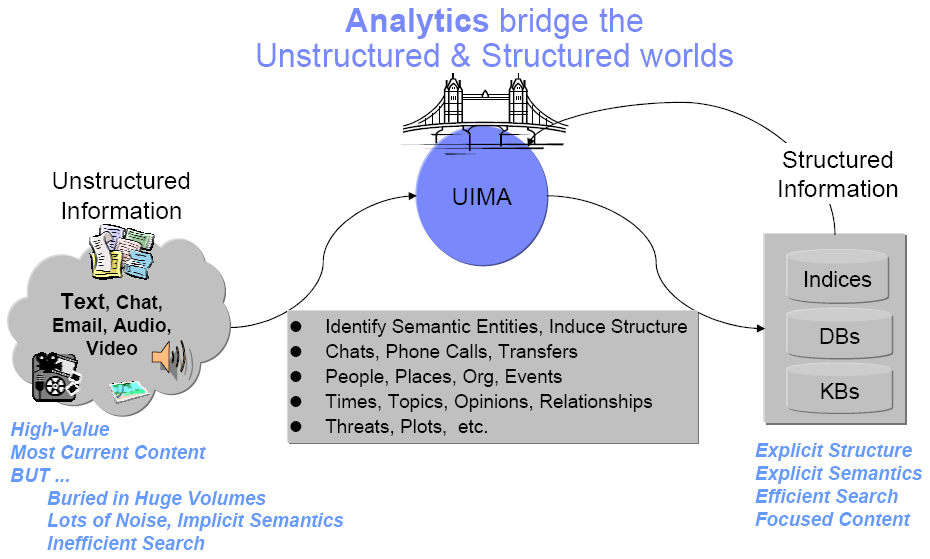
Unstructured information represents the largest, most current and fastest growing source of information available to businesses and governments. The web is just the tip of the iceberg. Consider the mounds of information hosted in the enterprise and around the world and across different media including text, voice and video. The high-value content in these vast collections of unstructured information is, unfortunately, buried in lots of noise. Searching for what you need or doing sophisticated data mining over unstructured information sources presents new challenges.
An unstructured information management (UIM) application may be generally characterized as a software system that analyzes large volumes of unstructured information (text, audio, video, images, etc.) to discover, organize and deliver relevant knowledge to the client or application end-user. An example is an application that processes millions of medical abstracts to discover critical drug interactions. Another example is an application that processes tens of millions of documents to discover key evidence indicating probable competitive threats.
First and foremost, the unstructured data must be analyzed to interpret, detect and locate concepts of interest, for example, named entities like persons, organizations, locations, facilities, products etc., that are not explicitly tagged or annotated in the original artifact. More challenging analytics may detect things like opinions, complaints, threats or facts. And then there are relations, for example, located in, finances, supports, purchases, repairs etc. The list of concepts important for applications to discover in unstructured content is large, varied and often domain specific. Many different component analytics may solve different parts of the overall analysis task. These component analytics must interoperate and must be easily combined to facilitate the developed of UIM applications.
The result of analysis are used to populate structured forms so that conventional data processing and search technologies like search engines, database engines or OLAP (On-Line Analytical Processing, or Data Mining) engines can efficiently deliver the newly discovered content in response to the client requests or queries.
In analyzing unstructured content, UIM applications make use of a variety of analysis technologies including:
Statistical and rule-based Natural Language Processing (NLP)
Information Retrieval (IR)
Machine learning
Ontologies
Automated reasoning and
Knowledge Sources (e.g., CYC, WordNet, FrameNet, etc.)
Specific analysis capabilities using these technologies are developed independently using different techniques, interfaces and platforms.
The bridge from the unstructured world to the structured world is built through the composition and deployment of these analysis capabilities. This integration is often a costly challenge.
The Unstructured Information Management Architecture (UIMA) is an architecture and software framework that helps you build that bridge. It supports creating, discovering, composing and deploying a broad range of analysis capabilities and linking them to structured information services.
UIMA allows development teams to match the right skills with the right parts of a solution and helps enable rapid integration across technologies and platforms using a variety of different deployment options. These ranging from tightly-coupled deployments for high-performance, single-machine, embedded solutions to parallel and fully distributed deployments for highly flexible and scaleable solutions.
UIMA is a software architecture which specifies component interfaces, data representations, design patterns and development roles for creating, describing, discovering, composing and deploying multi-modal analysis capabilities.
The UIMA framework provides a run-time environment in which developers can plug in their UIMA component implementations and with which they can build and deploy UIM applications. The framework is not specific to any IDE or platform. Apache hosts a Java and (soon) a C++ implementation of the UIMA Framework.
The UIMA Software Development Kit (SDK) includes the UIMA framework, plus tools and utilities for using UIMA. Some of the tooling supports an Eclipse-based ( http://www.eclipse.org/) development environment.
Key UIMA Concepts Introduced in this Section:
Analysis Engine, Document, Annotator, Annotator Developer, Type, Type System, Feature, Annotation, CAS, Sofa, JCas, UIMA Context.
UIMA is an architecture in which basic building blocks called Analysis Engines (AEs) are composed to analyze a document and infer and record descriptive attributes about the document as a whole, and/or about regions therein. This descriptive information, produced by AEs is referred to generally as analysis results. Analysis results typically represent meta-data about the document content. One way to think about AEs is as software agents that automatically discover and record meta-data about original content.
UIMA supports the analysis of different modalities including text, audio and video. The majority of examples we provide are for text. We use the term document, therefore, to generally refer to any unit of content that an AE may process, whether it is a text document or a segment of audio, for example. See the section Chapter 6, Multiple CAS Views of an Artifact in UIMA Tutorial and Developers' Guides for more information on multimodal processing in UIMA.
Analysis results include different statements about the content of a document. For example, the following is an assertion about the topic of a document:
(1) The Topic of document D102 is "CEOs and Golf".
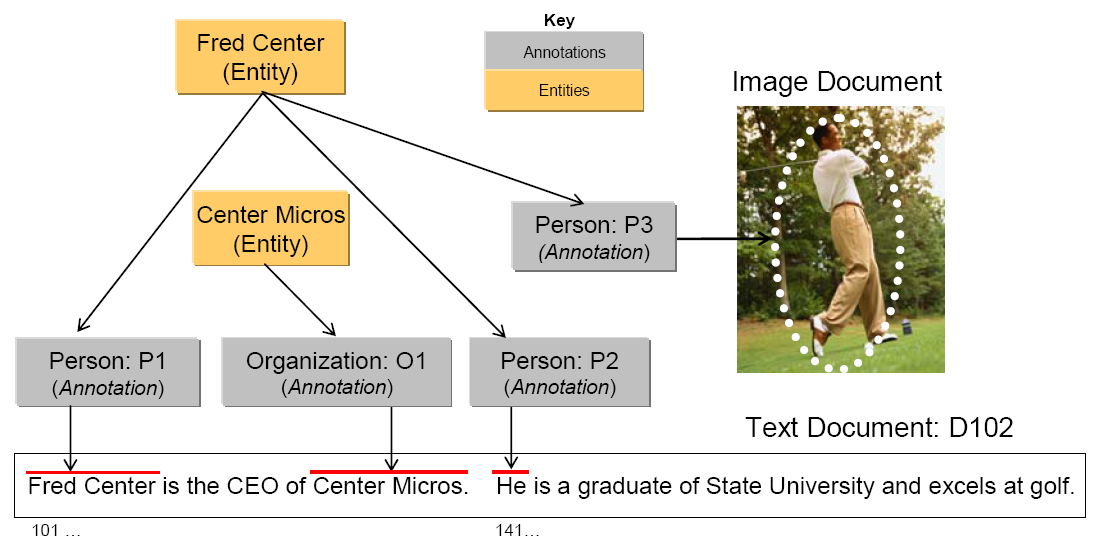
Analysis results may include statements describing regions more granular than the entire document. We use the term span to refer to a sequence of characters in a text document. Consider that a document with the identifier D102 contains a span, “Fred Centers” starting at character position 101. An AE that can detect persons in text may represent the following statement as an analysis result:
(2) The span from position 101 to 112 in document D102 denotes a Person
In both statements 1 and 2 above there is a special pre-defined term or what we call in UIMA a Type. They are Topic and Person respectively. UIMA types characterize the kinds of results that an AE may create – more on types later.
Other analysis results may relate two statements. For example, an AE might record in its results that two spans are both referring to the same person:
(3) The Person denoted by span 101 to 112 and
  the Person denoted by span 141 to 143 in document D102
  refer to the same Entity.
The above statements are some examples of the kinds of results that AEs may record to describe the content of the documents they analyze. These are not meant to indicate the form or syntax with which these results are captured in UIMA – more on that later in this overview.
The UIMA framework treats Analysis engines as pluggable, composible, discoverable, managed objects. At the heart of AEs are the analysis algorithms that do all the work to analyze documents and record analysis results.
UIMA provides a basic component type intended to house the core analysis algorithms running inside AEs. Instances of this component are called Annotators. The analysis algorithm developer's primary concern therefore is the development of annotators. The UIMA framework provides the necessary methods for taking annotators and creating analysis engines.
In UIMA the person who codes analysis algorithms takes on the role of the Annotator Developer. Chapter 1, Annotator and Analysis Engine Developer's Guide in UIMA Tutorial and Developers' Guides will take the reader through the details involved in creating UIMA annotators and analysis engines.
At the most primitive level an AE wraps an annotator adding the necessary APIs and infrastructure for the composition and deployment of annotators within the UIMA framework. The simplest AE contains exactly one annotator at its core. Complex AEs may contain a collection of other AEs each potentially containing within them other AEs.
How annotators represent and share their results is an important part of the UIMA architecture. UIMA defines a Common Analysis Structure (CAS) precisely for these purposes.
The CAS is an object-based data structure that allows the representation of objects, properties and values. Object types may be related to each other in a single-inheritance hierarchy. The CAS logically (if not physically) contains the document being analyzed. Analysis developers share and record their analysis results in terms of an object model within the CAS. [1]
The UIMA framework includes an implementation and interfaces to the CAS. For a more detailed description of the CAS and its interfaces see Chapter 4, CAS Reference in UIMA References.
A CAS that logically contains statement 2 (repeated here for your convenience)
(2) The span from position 101 to 112 in document D102 denotes a Person
would include objects of the Person type. For each person found in the body of a document, the AE would create a Person object in the CAS and link it to the span of text where the person was mentioned in the document.
While the CAS is a general purpose data structure, UIMA defines a few basic types and affords the developer the ability to extend these to define an arbitrarily rich Type System. You can think of a type system as an object schema for the CAS.
A type system defines the various types of objects that may be discovered in documents by AE's that subscribe to that type system.
As suggested above, Person may be defined as a type. Types have properties or features. So for example, Age and Occupation may be defined as features of the Person type.
Other types might be Organization, Company, Bank, Facility, Money, Size, Price, Phone Number, Phone Call, Relation, Network Packet, Product, Noun Phrase, Verb, Color, Parse Node, Feature Weight Array etc.
There are no limits to the different types that may be defined in a type system. A type system is domain and application specific.
Types in a UIMA type system may be organized into a taxonomy. For example, Company may be defined as a subtype of Organization. NounPhrase may be a subtype of a ParseNode.
A general and common type used in artifact analysis and from which additional types are often derived is the annotation type.
The annotation type is used to annotate or label regions of an artifact. Common artifacts are text documents, but they can be other things, such as audio streams. The annotation type for text includes two features, namely begin and end. Values of these features represent integer offsets in the artifact and delimit a span. Any particular annotation object identifies the span it annotates with the begin and end features.
The key idea here is that the annotation type is used to identify and label or “annotate” a specific region of an artifact.
Consider that the Person type is defined as a subtype of annotation. An annotator, for example, can create a Person annotation to record the discovery of a mention of a person between position 141 and 143 in document D102. The annotator can create another person annotation to record the detection of a mention of a person in the span between positions 101 and 112.
While the annotation type is a useful type for annotating regions of a document, annotations are not the only kind of types in a CAS. A CAS is a general representation scheme and may store arbitrary data structures to represent the analysis of documents.
As an example, consider statement 3 above (repeated here for your convenience).
(3) The Person denoted by span 101 to 112 and
  the Person denoted by span 141 to 143 in document D102
  refer to the same Entity.
This statement mentions two person annotations in the CAS; the first, call it P1 delimiting the span from 101 to 112 and the other, call it P2, delimiting the span from 141 to 143. Statement 3 asserts explicitly that these two spans refer to the same entity. This means that while there are two expressions in the text represented by the annotations P1 and P2, each refers to one and the same person.
The Entity type may be introduced into a type system to capture this kind of information. The Entity type is not an annotation. It is intended to represent an object in the domain which may be referred to by different expressions (or mentions) occurring multiple times within a document (or across documents within a collection of documents). The Entity type has a feature named occurrences. This feature is used to point to all the annotations believed to label mentions of the same entity.
Consider that the spans annotated by P1 and P2 were “Fred
Center” and “He” respectively. The annotator might create
a new Entity object called
FredCenter. To represent the relationship in statement 3 above,
the annotator may link FredCenter to both P1 and P2 by making them values of its
occurrences feature.
Figure 2.2, “Objects represented in the Common Analysis Structure (CAS)” also illustrates that an entity may be linked to annotations referring to regions of image documents as well. To do this the annotation type would have to be extended with the appropriate features to point to regions of an image.
UIMA supports the simultaneous analysis of multiple views of a document. This support comes in handy for processing multiple forms of the artifact, for example, the audio and the closed captioned views of a single speech stream, or the tagged and detagged views of an HTML document.
AEs analyze one or more views of a document. Each view contains a specific subject of analysis(Sofa), plus a set of indexes holding metadata indexed by that view. The CAS, overall, holds one or more CAS Views, plus the descriptive objects that represent the analysis results for each.
Another common example of using CAS Views is for different translations of a document. Each translation may be represented with a different CAS View. Each translation may be described by a different set of analysis results. For more details on CAS Views and Sofas see Chapter 6, Multiple CAS Views of an Artifact in UIMA Tutorial and Developers' Guides and Chapter 5, Annotations, Artifacts, and Sofas in UIMA Tutorial and Developers' Guides.
The two main interfaces that a UIMA component developer interacts with are the CAS and the UIMA Context.
UIMA provides an efficient implementation of the CAS with multiple programming interfaces. Through these interfaces, the annotator developer interacts with the document and reads and writes analysis results. The CAS interfaces provide a suite of access methods that allow the developer to obtain indexed iterators to the different objects in the CAS. See Chapter 4, CAS Reference in UIMA References. While many objects may exist in a CAS, the annotator developer can obtain a specialized iterator to all Person objects associated with a particular view, for example.
For Java annotator developers, UIMA provides the JCas. This interface provides the Java developer with a natural interface to CAS objects. Each type declared in the type system appears as a Java Class; the UIMA framework renders the Person type as a Person class in Java. As the analysis algorithm detects mentions of persons in the documents, it can create Person objects in the CAS. For more details on how to interact with the CAS using this interface, refer to Chapter 5, JCas Reference in UIMA References.
The component developer, in addition to interacting with the CAS, can access external resources through the framework's resource manager interface called the UIMA Context. This interface, among other things, can ensure that different annotators working together in an aggregate flow may share the same instance of an external file, for example. For details on using the UIMA Context see Chapter 1, Annotator and Analysis Engine Developer's Guide in UIMA Tutorial and Developers' Guides.
UIMA defines interfaces for a small set of core components that users of the framework provide implmentations for. Annotators and Analysis Engines are two of the basic building blocks specified by the architecture. Developers implement them to build and compose analysis capabilities and ultimately applications.
There are others components in addition to these, which we will learn about later, but for every component specified in UIMA there are two parts required for its implementation:
the declarative part and
the code part.
The declarative part contains metadata describing the component, its identity, structure and behavior and is called the Component Descriptor. Component descriptors are represented in XML. The code part implements the algorithm. The code part may be a program in Java.
As a developer using the UIMA SDK, to implement a UIMA component it is always the case that you will provide two things: the code part and the Component Descriptor. Note that when you are composing an engine, the code may be already provided in reusable subcomponents. In these cases you may not be developing new code but rather composing an aggregate engine by pointing to other components where the code has been included.
Component descriptors are represented in XML and aid in component discovery, reuse, composition and development tooling. The UIMA SDK provides tools for easily creating and maintaining the component descriptors that relieve the developer from editing XML directly. This tool is described briefly in Chapter 1, Annotator and Analysis Engine Developer's Guide in UIMA Tutorial and Developers' Guides, and more thoroughly in Chapter 1, Component Descriptor Editor User's Guide in UIMA Tools Guide and Reference .
Component descriptors contain standard metadata including the component's name, author, version, and a reference to the class that implements the component.
In addition to these standard fields, a component descriptor identifies the type system the component uses and the types it requires in an input CAS and the types it plans to produce in an output CAS.
For example, an AE that detects person types may require as input a CAS that includes a tokenization and deep parse of the document. The descriptor refers to a type system to make the component's input requirements and output types explicit. In effect, the descriptor includes a declarative description of the component's behavior and can be used to aid in component discovery and composition based on desired results. UIMA analysis engines provide an interface for accessing the component metadata represented in their descriptors. For more details on the structure of UIMA component descriptors refer to Chapter 2, Component Descriptor Reference in UIMA References.
Key UIMA Concepts Introduced in this Section:
Aggregate Analysis Engine, Delegate Analysis Engine, Tightly and Loosely Coupled, Flow Specification, Analysis Engine Assembler

A simple or primitive UIMA Analysis Engine (AE) contains a single annotator. AEs, however, may be defined to contain other AEs organized in a workflow. These more complex analysis engines are called Aggregate Analysis Engines.
Annotators tend to perform fairly granular functions, for example language detection, tokenization or part of speech detection. These functions typically address just part of an overall analysis task. A workflow of component engines may be orchestrated to perform more complex tasks.
An AE that performs named entity detection, for example, may include a pipeline of annotators starting with language detection feeding tokenization, then part-of-speech detection, then deep grammatical parsing and then finally named-entity detection. Each step in the pipeline is required by the subsequent analysis. For example, the final named-entity annotator can only do its analysis if the previous deep grammatical parse was recorded in the CAS.
Aggregate AEs are built to encapsulate potentially complex internal structure and insulate it from users of the AE. In our example, the aggregate analysis engine developer acquires the internal components, defines the necessary flow between them and publishes the resulting AE. Consider the simple example illustrated in Figure 2.3, “Sample Aggregate Analysis Engine” where “MyNamed-EntityDetector” is composed of a linear flow of more primitive analysis engines.
Users of this AE need not know how it is constructed internally but only need its name and its published input requirements and output types. These must be declared in the aggregate AE's descriptor. Aggregate AE's descriptors declare the components they contain and a flow specification. The flow specification defines the order in which the internal component AEs should be run. The internal AEs specified in an aggregate are also called the delegate analysis engines. The term "delegate" is used because aggregate AE's are thought to "delegate" functions to their internal AEs.
In UIMA 2.0, the developer can implement a "Flow Controller" and include it as part of an aggregate AE by referring to it in the aggregate AE's descriptor. The flow controller is responsible for computing the "flow", that is, for determining the order in which of delegate AE's that will process the CAS. The Flow Contoller has access to the CAS and any external resources it may require for determining the flow. It can do this dynamically at run-time, it can make multi-step decisions and it can consider any sort of flow specification included in the aggregate AE's descriptor. See Chapter 4, Flow Controller Developer's Guide in UIMA Tutorial and Developers' Guides for details on the UIMA Flow Controller interface.
We refer to the development role associated with building an aggregate from delegate AEs as the Analysis Engine Assembler .
The UIMA framework, given an aggregate analysis engine descriptor, will run all delegate AEs, ensuring that each one gets access to the CAS in the sequence produced by the flow controller. The UIMA framework is equipped to handle different deployments where the delegate engines, for example, are tightly-coupled (running in the same process) or loosely-coupled (running in separate processes or even on different machines). The framework supports a number of remote protocols for loose coupling deployments of aggregate analysis engines, including SOAP (which stands for Simple Object Access Protocol, a standard Web Services communications protocol).
The UIMA framework facilitates the deployment of AEs as remote services by using an adapter layer that automatically creates the necessary infrastructure in response to a declaration in the component's descriptor. For more details on creating aggregate analysis engines refer to Chapter 2, Component Descriptor Reference in UIMA References The component descriptor editor tool assists in the specification of aggregate AEs from a repository of available engines. For more details on this tool refer to Chapter 1, Component Descriptor Editor User's Guide in UIMA Tools Guide and Reference.
The UIMA framework implementation has two built-in flow implementations: one that support a linear flow between components, and one with conditional branching based on the language of the document. It also supports user-provided flow controllers, as described in Chapter 4, Flow Controller Developer's Guide in UIMA Tutorial and Developers' Guides. Furthermore, the application developer is free to create multiple AEs and provide their own logic to combine the AEs in arbitrarily complex flows. For more details on this the reader may refer to Section 3.2, “Using Analysis Engines” in UIMA Tutorial and Developers' Guides.
Key UIMA Concepts Introduced in this Section:
Process Method, Collection Processing Architecture, Collection Reader, CAS Consumer, CAS Initializer, Collection Processing Engine, Collection Processing Manager.
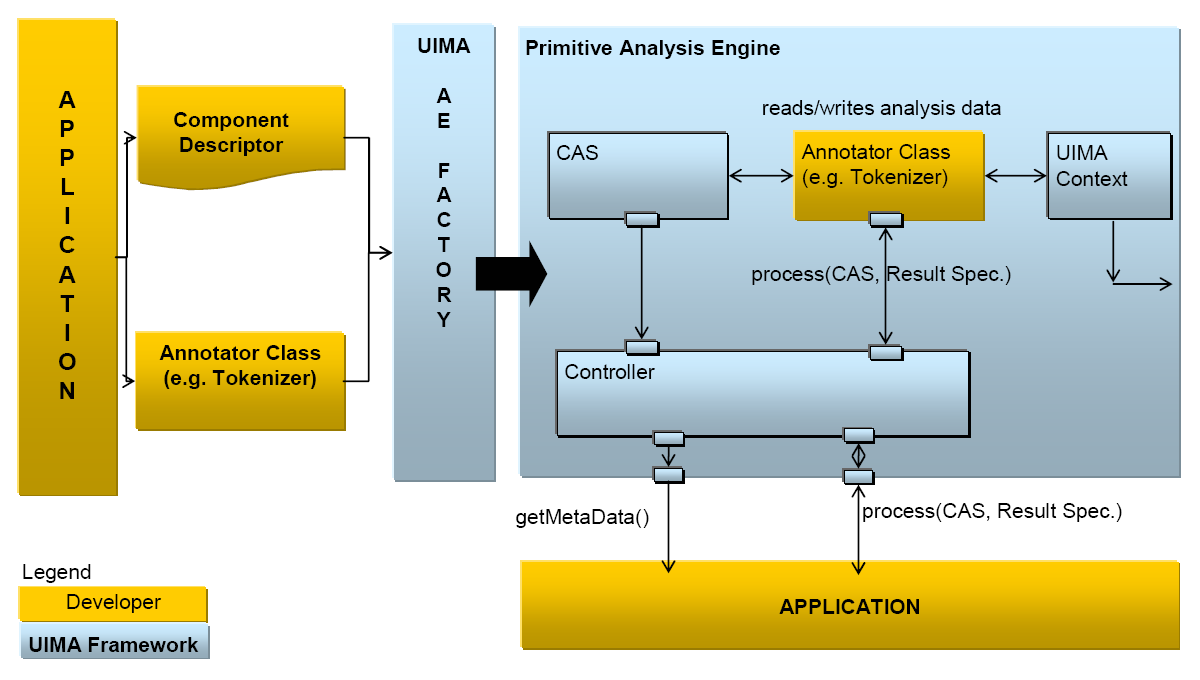
As mentioned above, the basic AE interface may be thought of as simply CAS in/CAS out.
The application is responsible for interacting with the UIMA framework to instantiate an AE, create or acquire an input CAS, initialize the input CAS with a document and then pass it to the AE through the process method. This interaction with the framework is illustrated in Figure 2.4, “Using UIMA Framework to create and interact with an Analysis Engine”.
The UIMA AE Factory takes the declarative information from the Component Descriptor and the class files implementing the annotator, and instantiates the AE instance, setting up the CAS and the UIMA Context.
The AE, possibly calling many delegate AEs internally, performs the overall analysis and its process method returns the CAS containing new analysis results.
The application then decides what to do with the returned CAS. There are many possibilities. For instance the application could: display the results, store the CAS to disk for post processing, extract and index analysis results as part of a search or database application etc.
The UIMA framework provides methods to support the application developer in creating and managing CASes and instantiating, running and managing AEs. Details may be found in Chapter 3, Application Developer's Guide in UIMA Tutorial and Developers' Guides.
Many UIM applications analyze entire collections of documents. They connect to different document sources and do different things with the results. But in the typical case, the application must generally follow these logical steps:
Connect to a physical source
Acquire a document from the source
Initialize a CAS with the document to be analyzed
Send the CAS to a selected analysis engine
Process the resulting CAS
Go back to 2 until the collection is processed
Do any final processing required after all the documents in the collection have been analyzed
UIMA supports UIM application development for this general type of processing through its Collection Processing Architecture.
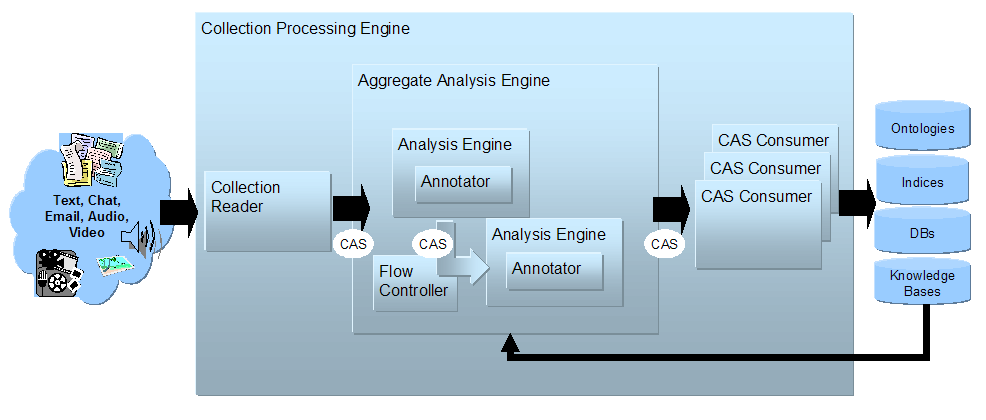
As part of the collection processing architecture UIMA introduces two primary components in addition to the annotator and analysis engine. These are the Collection Reader and the CAS Consumer. The complete flow from source, through document analysis, and to CAS Consumers supported by UIMA is illustrated in Figure 2.5, “High-Level UIMA Component Architecture from Source to Sink”.
The Collection Reader's job is to connect to and iterate through a source collection, acquiring documents and initializing CASes for analysis.
CAS Consumers, as the name suggests, function at the end of the flow. Their job is to do the final CAS processing. A CAS Consumer may be implemented, for example, to index CAS contents in a search engine, extract elements of interest and populate a relational database or serialize and store analysis results to disk for subsequent and further analysis.
A Semantic Search engine that works with UIMA is available from IBM's alphaWorks site which will allow the developer to experiment with indexing analysis results and querying for documents based on all the annotations in the CAS. See the section on integrating text analysis and search in Chapter 3, Application Developer's Guide in UIMA Tutorial and Developers' Guides.
A UIMA Collection Processing Engine (CPE) is an aggregate component that specifies a “source to sink” flow from a Collection Reader though a set of analysis engines and then to a set of CAS Consumers.
CPEs are specified by XML files called CPE Descriptors. These are declarative specifications that point to their contained components (Collection Readers, analysis engines and CAS Consumers) and indicate a flow among them. The flow specification allows for filtering capabilities to, for example, skip over AEs based on CAS contents. Details about the format of CPE Descriptors may be found in Chapter 3, Collection Processing Engine Descriptor Reference in UIMA References.
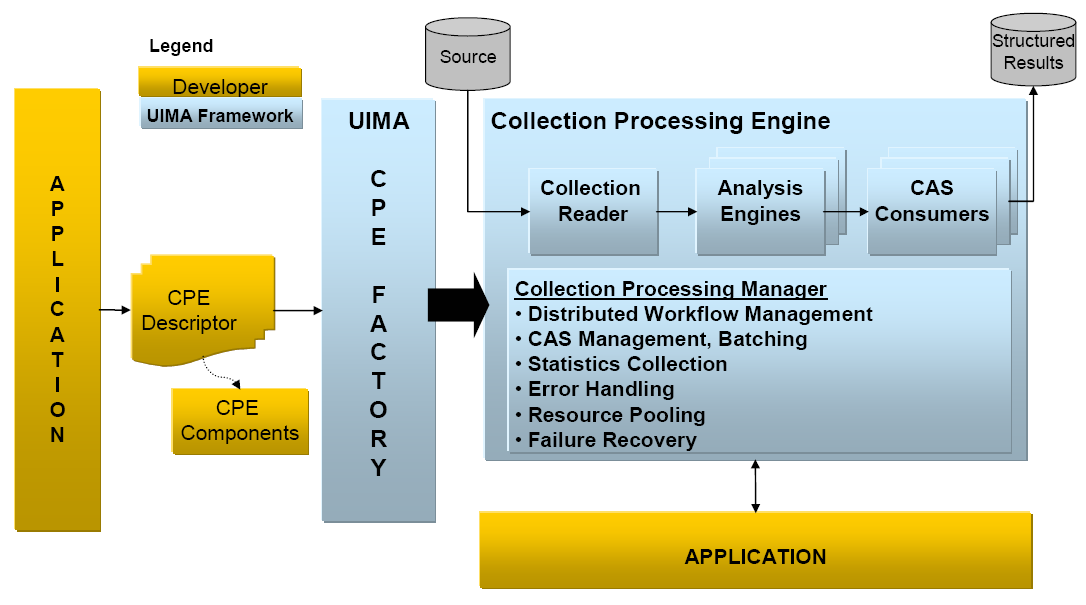
The UIMA framework includes a Collection Processing Manager (CPM). The CPM is capable of reading a CPE descriptor, and deploying and running the specified CPE. Figure 2.5, “High-Level UIMA Component Architecture from Source to Sink” illustrates the role of the CPM in the UIMA Framework.
Key features of the CPM are failure recovery, CAS management and scale-out.
Collections may be large and take considerable time to analyze. A configurable behavior of the CPM is to log faults on single document failures while continuing to process the collection. This behavior is commonly used because analysis components often tend to be the weakest link -- in practice they may choke on strangely formatted content.
This deployment option requires that the CPM run in a separate process or a machine distinct from the CPE components. A CPE may be configured to run with a variety of deployment options that control the features provided by the CPM. For details see Chapter 3, Collection Processing Engine Descriptor Reference in UIMA References .
The UIMA SDK also provides a tool called the CPE Configurator. This tool provides the developer with a user interface that simplifies the process of connecting up all the components in a CPE and running the result. For details on using the CPE Configurator see Chapter 2, Collection Processing Engine Configurator User's Guide in UIMA Tools Guide and Reference. This tool currently does not provide access to the full set of CPE deployment options supported by the CPM; however, you can configure other parts of the CPE descriptor by editing it directly. For details on how to create and run CPEs refer to Chapter 2, Collection Processing Engine Developer's Guide in UIMA Tutorial and Developers' Guides.
Key UIMA Concepts Introduced in this Section:
Semantic Search, XML Fragment Queries.
In a simple UIMA Collection Processing Engine (CPE), a Collection Reader reads documents from the file system and initializes CASs with their content. These are then fed to an AE that annotates tokens and sentences, the CASs, now enriched with token and sentence information, are passed to a CAS Consumer that populates a search engine index.
The search engine query processor can then use the token index to provide basic key-word search. For example, given a query “center” the search engine would return all the documents that contained the word “center”.
Semantic Search is a search paradigm that can exploit the additional metadata generated by analytics like a UIMA CPE.
Consider that we plugged a named-entity recognizer into the CPE described above. Assume this analysis engine is capable of detecting in documents and annotating in the CAS mentions of persons and organizations.
Complementing the name-entity recognizer we add a CAS Consumer that extracts in addition to token and sentence annotations, the person and organizations added to the CASs by the name-entity detector. It then feeds these into the semantic search engine's index.
The semantic search engine that comes with the UIMA SDK, for example, can exploit this addition information from the CAS to support more powerful queries. For example, imagine a user is looking for documents that mention an organization with “center” it is name but is not sure of the full or precise name of the organization. A key-word search on “center” would likely produce way too many documents because “center” is a common and ambiguous term. The semantic search engine that is available from http://www.alphaworks.ibm.com/tech/uima supports a query language called XML Fragments. This query language is designed to exploit the CAS annotations entered in its index. The XML Fragment query, for example,
<organization> center </organization>
will produce first only documents that contain “center” where it appears as part of a mention annotated as an organization by the name-entity recognizer. This will likely be a much shorter list of documents more precisely matching the user's interest.
Consider taking this one step further. We add a relationship recognizer that annotates mentions of the CEO-of relationship. We configure the CAS Consumer so that it sends these new relationship annotations to the semantic search index as well. With these additional analysis results in the index we can submit queries like
<ceo_of>
    <person> center </person>
    <organization> center </organization>
<ceo_of>
This query will precisely target documents that contain a mention of an organization
with “center” as part of its name where that organization is mentioned
as part of a
CEO-of relationship annotated by the relationship
recognizer.
For more details about using UIMA and Semantic Search see the section on integrating text analysis and search in Chapter 3, Application Developer's Guide in UIMA Tutorial and Developers' Guides.
Search engine indices are not the only place to deposit analysis results for use by applications. Another classic example is populating databases. While many approaches are possible with varying degrees of flexibly and performance all are highly dependent on application specifics. We included a simple sample CAS Consumer that provides the basics for getting your analysis result into a relational database. It extracts annotations from a CAS and writes them to a relational database, using the open source Apache Derby database.
In previous sections we've seen how the CAS is initialized with an initial artifact that will be subsequently analyzed by Analysis engines and CAS Consumers. The first Analysis engine may make some assertions about the artifact, for example, in the form of annotations. Subsequent Analysis engines will make further assertions about both the artifact and previous analysis results, and finally one or more CAS Consumers will extract information from these CASs for structured information storage.
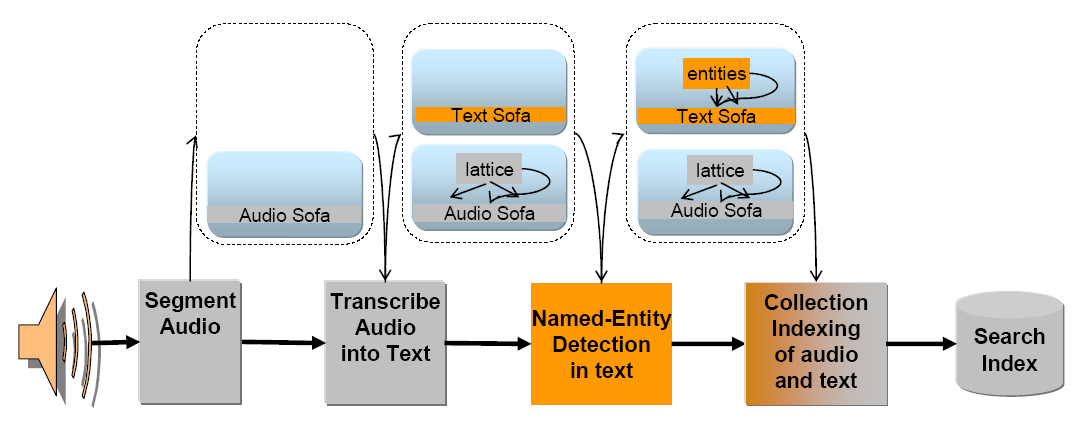 |
Figure 2.7. Multiple Sofas in support of multi-modal analysis of an audio Stream. Some engines work on the audio “view”, some on the text “view” and some on both.
Consider a processing pipeline, illustrated in Figure 2.7, “Multiple Sofas in support of multi-modal analysis of an audio Stream. Some engines work on the audio “view”, some on the text “view” and some on both.”, that starts with an audio recording of a conversation, transcribes the audio into text, and then extracts information from the text transcript. Analysis Engines at the start of the pipeline are analyzing an audio subject of analysis, and later analysis engines are analyzing a text subject of analysis. The CAS Consumer will likely want to build a search index from concepts found in the text to the original audio segment covered by the concept.
What becomes clear from this relatively simple scenario is that the CAS must be capable of simultaneously holding multiple subjects of analysis. Some analysis engine will analyze only one subject of analysis, some will analyze one and create another, and some will need to access multiple subjects of analysis at the same time.
The support in UIMA for multiple subjects of analysis is called Sofa support; Sofa is an acronym which is derived from Subject of Analysis, which is a physical representation of an artifact (e.g., the detagged text of a web-page, the HTML text of the same web-page, the audio segment of a video, the close-caption text of the same audio segment). A Sofa may be associated with CAS Views. A particular CAS will have one or more views, each view corresponding to a particular subject of analysis, together with a set of the defined indexes that index the metadata created in that view.
Analysis results can be indexed in, or “belong” to, a specific view. UIMA components may be written in “Multi-View” mode - able to create and access multiple Sofas at the same time, or in “Single-View” mode, simply receiving a particular view of the CAS corresponding to a particular single Sofa. For single-view mode components, it is up to the person assembling the component to supply the needed information to insure a particular view is passed to the component at run time. This is done using XML descriptors for Sofa mapping (see Section 6.4, “Sofa Name Mapping” in UIMA Tutorial and Developers' Guides).
Multi-View capability brings benefits to text-only processing as well. An input document can be transformed from one format to another. Examples of this include transforming text from HTML to plain text or from one natural language to another.
This chapter presented a high-level overview of UIMA concepts. Along the way, it pointed to other documents in the UIMA SDK documentation set where the reader can find details on how to apply the related concepts in building applications with the UIMA SDK.
At this point the reader may return to the documentation guide in Section 1.2, “How to use the Documentation” to learn how they might proceed in getting started using UIMA.
For a more detailed overview of the UIMA architecture, framework and development roles we refer the reader to the following paper:
D. Ferrucci and A. Lally, “Building an example application using the Unstructured Information Management Architecture,” IBM Systems Journal 43, No. 3, 455-475 (2004).
This paper can be found on line at http://www.research.ibm.com/journal/sj43-3.html
[1] We have plans to extend the representational capabilities of the CAS and align its semantics with the semantics of the OMG's Essential Meta-Object Facility (EMOF) and with the semantics of the Eclipse Modeling Framework's ( http://www.eclipse.org/emf/) Ecore semantics and XMI-based representation.
This chapter describes how to set up the UIMA SDK to work with Eclipse. Eclipse (http://www.eclipse.org) is a popular open-source Integrated Development Environment for many things, including Java. The UIMA SDK does not require that you use Eclipse. However, we recommend that you do use Eclipse because some useful UIMA SDK tools run as plug-ins to the Eclipse platform and because the UIMA SDK examples are provided in a form that's easy to import into your Eclipse environment.
If you are not planning on using the UIMA SDK with Eclipse, you may skip this chapter and read Chapter 1, Annotator and Analysis Engine Developer's Guide in UIMA Tutorial and Developers' Guides next.
This chapter provides instructions for
installing Eclipse,
installing the UIMA SDK's Eclipse plugins into your Eclipse environment, and
importing the example UIMA code into an Eclipse project.
The UIMA Eclipse plugins are designed to be used with Eclipse version 3.1 or later.
Note
You will need to run Eclipse using a Java at the 1.5 or later level, in order to use the UIMA Eclipse plugins.
Go to http://www.eclipse.org and follow the instructions there to download Eclipse.
We recommend using the latest release level (not an “Integration level”). Navigate to the Eclipse Release version you want and download the archive for your platform.
Unzip the archive to install Eclipse somewhere, e.g., c:\
Eclipse has a bit of a learning curve. If you plan to make significant use of Eclipse, check out the tutorial under the help menu. It is well worth the effort. There are also books you can get that describe Eclipse and its use.
The first time Eclipse starts up it will take a bit longer as it completes its installation. A “welcome” page will come up. After you are through reading the welcome information, click on the arrow to exit the welcome page and get to the main Eclipse screens.
The best way to do this is to use the Eclipse Update mechanism, because that will insure that all needed prerequisites are also installed. See below for an alternative, manual approach.
Note
If your computer is on an internet connection which uses a proxy server, you can configure Eclipse to know about that. Put your proxy settings into Eclipse using the Eclipse preferences by accessing the menus: Window → Preferences... → Install/Update, and Enable HTTP proxy connection under the Proxy Settings with the information about your proxy.
To use the Eclipse Update mechanism, start Eclipse, and then pick the menu Help → Software Updates → Find and Install.... On the next page, select the option to Search for new features to install, and press the Next button. On the next panel, update sites to visit, press the "Add a new remote site" button and enter the URL http://www.apache.org/dist/uima/eclipse-update-site, and press OK. On the previous page will now appear this new Site, and it should be checked.
Also check the Europa (or Callisto) Discovery Site, which is where the EMF core plugins are (EMF stands for Eclipse Modeling Framework; it is an add-on to Eclipse, and is used by some of the UIMA Eclipse tooling).
Now click finish, and follow the remaining panels to install the UIMA plugins. If you do not have a compatible level of EMF installed, when you select the UIMA plugins, you will get a message saying it needs EMF. To add EMF to the list of plugins to be downloaded, just expand the Discovery Site entry by clicking it's little "plus" sign and then push the "Select Required" button on the right of the panel. This will select the part of EMF that is needed.
You can skip this section if you installed EMF using the above process.
Warning
EMF comes in many versions; you must install the version that corresponds to the level of Eclipse that you are running. This is automatically done for you if you install it using the Eclipse update mechanism, described below. If you separately download an EMF package, you will need to verify it is the version that corresponds to the level of Eclipse you are running, before installing it.
Before installing EMF using these instructions, please go to http://www.eclipse.org/emf and read the installation instructions, and then click on the "Update Manager" link to see what url to use in the next step, where you use the built-in facilities in Eclipse to find and install new features.
The exact way to install EMF changes from time to time. In the next few paragraphs, we try to give instructions that should work for most versions. Please see the end of this section for shortcut instructions for the current version of Eclipse at the time of this writing, Eclipse 3.3.
Activate the software feature finding by using the menu: Help → Software Updates → Find and Install. Select “Search for new features to install”, push “Next”. Specify the update sites to use to search for EMF, making sure the “Ignore features not applicable to this environment” box is checked (at the bottom of the dialog), and push “Finish”. A good site to use is one of the Discovery Sites (e.g. Callisto or Europa) - which has a collection of Eclipse components including EMF.
This will launch a search for updates to Eclipse; it may show a list of update site mirrors – click OK. When it finishes, it shows a list of possible updates in an expandable tree. Expand the tree nodes to find EMF SDK. The specific level may vary from the level shown below as newer versions are released.
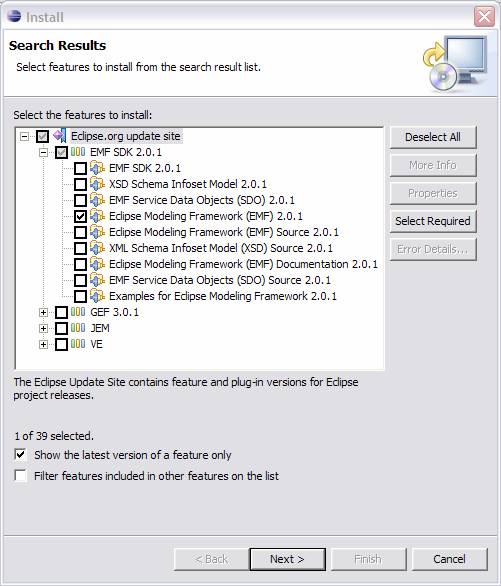 |
Click “Next”. Then pick Eclipse Modeling Framework (EMF), and push “Next”, accept any licensing agreements, etc., until it finishes the installation. It may say it's an “unsigned feature”; proceed by clicking “Install”. If it recommends restarting, you may do that.
This will install EMF, without any extras. (If you want the whole EMF system, including source and documentation, you can pick the “EMF SDK” and the “Examples for Eclipse Modeling Framework”.)
Since Eclipse 3.2, all major Eclipse sub-projects coordinate their release timeframes and publish the consolidated releases. The code name for 3.2 was Callisto, the one for 3.3 is Europa. You can easily install EMF via the release discovery site as follows.
From the Eclipse menu, select Help/Software Updates/Find and Install.../Search for new features to install.
Check the "[release name] discovery site", push "Next".
Select a convenient mirror site.
Check the EMF box under "Models and model development"
Follow the instructions for the rest of the install.
If you haven't already done so, please download and install the UIMA SDK from
http://incubator.apache.org/uima. Be sure to set the environmental variable
UIMA_HOME pointing to the root of the installed UIMA SDK and run the
adjustExamplePaths.bat or adjustExamplePaths.sh
script, as explained in the README.
The environmental parameter UIMA_HOME is used by the command-line scripts in the %UIMA_HOME%/bin directory as well as by eclipse run configurations in the uimaj-examples sample project.
If you installed the UIMA plugins using the update mechanism above, please skip this section.
If you are unable to use the Eclipse Update mechanism to install the UIMA plugins, you can do this manually. In the directory %UIMA_HOME%/eclipsePlugins (The environment variable %UIMA_HOME% is where you installed the UIMA SDK), you will see a set of folders. Copy these to your %ECLIPSE_HOME%/eclipse/plugins directory (%ECLIPSE_HOME% is where you installed Eclipse).
If you have Eclipse running, restart it (shut it down, and start it again) using
the
-clean option; you can do this by running the command
eclipse -clean (see explanation in the next section) in the
directory where you installed Eclipse. You may want to set up a desktop shortcut at
this point for Eclipse.
If you have modified the plugin structure (by copying or files directly in the file system) in Eclipse 3.x after you started it for the first time, please include the “-clean” parameter in the startup arguments to Eclipse, one time (after any plugin modifications were done). This is needed because Eclipse may not notice the changes you made, otherwise. This parameter forces Eclipse to reexamine all of its plugins at startup and recompute any cached information about them.
Later chapters refer to example code. You can create a special project in Eclipse to hold the examples. Here's how:
In Eclipse, if the Java perspective is not already open, switch to it by going to Window → Open Perspective → Java.
Set up a class path variable named UIMA_HOME, whose value is the directory where you installed the UIMA SDK. This is done as follows:
Go to Window → Preferences → Java → Build Path → Classpath Variables.
Click “New”
Enter UIMA_HOME (all capitals, exactly as written) in the “Name” field.
Enter your installation directory (e.g.
C:/Program
            Files/apache-uima
) in the “Path” fieldClick “OK” in the “New Variable Entry” dialog
Click “OK” in the “Preferences” dialog
If it asks you if you want to do a full build, click “Yes”
Select the File → Import menu option
Select “General/Existing Project into Workspace” and click the “Next” button.
Click “Browse” and browse to the %UIMA_HOME%/ directory
Click “Finish.” This will create a new project called “uimaj-examples” in your Eclipse workspace. There should be no compilation errors.
To verify that you have set up the project correctly, check that there are no error messages in the “Problems” view.
If you would like to be able to jump to the UIMA source code in Eclipse or to step through it with the debugger, you can add the UIMA source code to the jar files. This is done via a shell script that comes with the source distribution. To add the source code to the jars, you need to:
Download and unpack the UIMA source distribution.
Download and install the UIMA binary distribution (the UIMA_HOME environment variable needs to be set to point to where you installed the UIMA binary distribution).
Execute the addSourceToJars script in the root directory of the source distribution.
This adds the source code to the jar files, and it will then be automatically available from Eclipse. There is no further Eclipse setup required.
The binary distribution also includes the UIMA Javadocs. They are attached to the UIMA library Jar files in the uima-examples project described above. You can attach the Javadocs to your own project as well.
Note
If you attached the source as described in the previous section, you don't need to attach the Javadocs because the source includes the Javadoc comments.
Attaching the Javadocs enables Javadoc help for UIMA APIs. After they are attached, if you hover your mouse over a certain UIMA api element, the corresponding Javadoc will appear. You can then press “F2” to make the hover "stick", or “Shift-F2” to open the default web-browser on your system to let you browse the entire Javadoc information for that element.
If this pop-up behavior is something you don't want, you can turn it off in the Eclipse preferences, in the menu Window → Preferences → Java → Editors → hovers.
Eclipse also has a Javadoc "view" which you can show, using the Window → Show View → Javadoc.
See Section 1.1, “Using named Eclipse User Libraries” in UIMA References for information on how to set up a UIMA "library" with the Javadocs attached, which can be reused for other projects in your Eclipse workspace.
You can attach the Javadocs to each UIMA library jar you think you might be interested in. It makes most sense for the uima-core.jar, you'll probably use the core APIs most of all.
Here's a screenshot of what you should see when you hover your mouse pointer over the class name “CAS” in the source code.
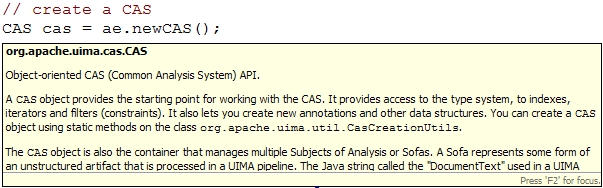 |
You can run many tools without using Eclipse at all, by using the shell scripts in the UIMA SDK's bin directory. In addition, many tools can be run from inside Eclipse; examples are the Document Analyzer, CPE Configurator, CAS Visual Debugger, and JCasGen. The uimaj-examples project provides Eclipse launch configurations that make this easy to do.
To run these tools from Eclipse:
If the Java perspective is not already open, switch to it by going to Window → Open Perspective → Java.
Go to Run → Run...
In the window that appears, select “UIMA CPE GUI”, “UIMA CAS Visual Debugger”, “UIMA JCasGen”, or “UIMA Document Analyzer” from the list of run configurations on the left. (If you don't see, these, please select the uimaj-examples project and do a Menu → File → Refresh).
Press the “Run” button. The tools should start. Close the tools by clicking the “X” in the upper right corner on the GUI.
For instructions on using the Document Analyzer and CPE Configurator, see Chapter 3, Document Analyzer User's Guide in UIMA Tools Guide and Reference, and Chapter 2, Collection Processing Engine Configurator User's Guide in UIMA Tools Guide and Reference For instructions on using the CAS Visual Debugger and JCasGen, see Chapter 5, CAS Visual Debugger in UIMA Tools Guide and Reference and Chapter 6, JCasGen User's Guide in UIMA Tools Guide and Reference
- What is UIMA?
UIMA stands for Unstructured Information Management Architecture. It is component software architecture for the development, discovery, composition and deployment of multi-modal analytics for the analysis of unstructured information.
UIMA processing occurs through a series of modules called analysis engines. The result of analysis is an assignment of semantics to the elements of unstructured data, for example, the indication that the phrase “Washington” refers to a person's name or that it refers to a place.
Analysis Engine's output can be saved in conventional structures, for example, relational databases or search engine indices, where the content of the original unstructured information may be efficiently accessed according to its inferred semantics.
UIMA supports developers in creating, integrating, and deploying components across platforms and among dispersed teams working to develop unstructured information management applications.
- How do you pronounce UIMA?
You – eee – muh.
- What's the difference between UIMA and the Apache UIMA?
UIMA is an architecture which specifies component interfaces, design patterns, data representations and development roles.
Apache UIMA is an open source, Apache-licensed software project, currently undergoing incubation at Apache.org. It includes run-time frameworks in Java and C++, APIs and tools for implementing, composing, packaging and deploying UIMA components.
The UIMA run-time framework allows developers to plug-in their components and applications and run them on different platforms and according to different deployment options that range from tightly-coupled (running in the same process space) to loosely-coupled (distributed across different processes or machines for greater scale, flexibility and recoverability).
- Does UIMA include a semantic search engine?
The Apache UIMA project does not itself include a semantic search engine. It can interface with the semantic search engine component (available from www.alphaworks.ibm.com/tech/uima for indexing and querying over the results of analysis. Over time, we expect that additional search engines will add support for semantic searching.
- What is an Annotation?
An annotation is metadata that is associated with a region of a document. It often is a label, typically represented as string of characters. The region may be the whole document.
An example is the label “Person” associated with the span of text “George Washington”. We say that “Person” annotates “George Washington” in the sentence “George Washington was the first president of the United States”. The association of the label “Person” with a particular span of text is an annotation. Another example may have an annotation represent a topic, like “American Presidents” and be used to label an entire document.
Annotations are not limited to regions of texts. An annotation may annotate a region of an image or a segment of audio. The same concepts apply.
- What is the CAS?
The CAS stands for Common Analysis Structure. It provides cooperating UIMA components with a common representation and mechanism for shared access to the artifact being analyzed (e.g., a document, audio file, video stream etc.) and the current analysis results.
- What does the CAS contain?
The CAS is a data structure for which UIMA provides multiple interfaces. It contains and provides the analysis algorithm or application developer with access to
the subject of analysis (the artifact being analyzed, like the document),
the analysis results or metadata(e.g., annotations, parse trees, relations, entities etc.),
indices to the analysis results, and
the type system (a schema for the analysis results).
A CAS can hold multiple versions of the artifact being analyzed (for instance, a raw html document, and a detagged version, or an English version and a corresponding German version, or an audio sample, and the text that corresponds, etc.). For each version there is a separate instance of the results indices.
- Does the CAS only contain Annotations?
No. The CAS contains the artifact being analyzed plus the analysis results. Analysis results are those metadata recorded by analysis engines in the CAS. The most common form of analysis result is the addition of an annotation. But an analysis engine may write any structure that conforms to the CAS's type system into the CAS. These may not be annotations but may be other things, for example links between annotations and properties of objects associated with annotations.
The CAS may have multiple representations of the artifact being analyzed, each one represented in the CAS as a particular Subject of Analysis. or Sofa
- Is the CAS just XML?
No, in fact there are many possible representations of the CAS. If all of the analysis engines are running in the same process, an efficient, in-memory data object is used. If a CAS must be sent to an analysis engine on a remote machine, it can be done via an XML or a binary serialization of the CAS.
The UIMA framework provides serialization and de-serialization methods for a particular XML representation of the CAS named the XMI.
- What is a Type System?
Think of a type system as a schema or class model for the CAS. It defines the types of objects and their properties (or features) that may be instantiated in a CAS. A specific CAS conforms to a particular type system. UIMA components declare their input and output with respect to a type system.
Type Systems include the definitions of types, their properties, range types (these can restrict the value of properties to other types) and single-inheritance hierarchy of types.
- What is a Sofa?
Sofa stands for “Subject of Analysis". A CAS is associated with a single artifact being analysed by a collection of UIMA analysis engines. But a single artifact may have multiple independent views, each of which may be analyzed separately by a different set of analysis engines. For example, given a document it may have different translations, each of which are associated with the original document but each potentially analyzed by different engines. A CAS may have multiple Views, each containing a different Subject of Analysis corresponding to some version of the original artifact. This feature is ideal for multi-modal analysis, where for example, one view of a video stream may be the video frames and the other the close-captions.
- What's the difference between an Annotator and an Analysis Engine?
In the terminology of UIMA, an annotator is simply some code that analyzes documents and outputs annotations on the content of the documents. The UIMA framework takes the annotator, together with metadata describing such things as the input requirements and outputs types of the annotator, and produces an analysis engine.
Analysis Engines contain the framework-provided infrastructure that allows them to be easily combined with other analysis engines in different flows and according to different deployment options (collocated or as web services, for example).
Analysis Engines are the framework-generated objects that an Application interacts with. An Annotator is a user-written class that implements the one of the supported Annotator interfaces.
- Are UIMA analysis engines web services?
They can be deployed as such. Deploying an analysis engine as a web service is one of the deployment options supported by the UIMA framework.
- Do Analysis Engines have to be "stateless"?
This is a user-specifyable option. The XML metadata for the component includes an
operationalPropertieselement which can specify if multiple deployment is allowed. If true, then a particular instance of an Engine might not see all the CASes being processed. If false, then that component will see all of the CASes being processed. In this case, it can accumulate state information among all the CASes. Typically, Analysis Engines in the main analysis pipeline are marked multipleDeploymentAllowed = true. The CAS Consumer component, on the other hand, defaults to having this property set to false, and is typically associated with some resource like a database or search engine that aggregates analysis results across an entire collection.Analysis Engines developers are encouraged not to maintain state between documents that would prevent their engine from working as advertised if operated in a parallelized environment.
- Is engine meta-data compatible with web services and UDDI?
All UIMA component implementations are associated with Component Descriptors which represents metadata describing various properties about the component to support discovery, reuse, validation, automatic composition and development tooling. In principle, UIMA component descriptors are compatible with web services and UDDI. However, the UIMA framework currently uses its own XML representation for component metadata. It would not be difficult to convert between UIMA's XML representation and the WSDL and UDDI standards.
- How do you scale a UIMA application?
The UIMA framework allows components such as analysis engines and CAS Consumers to be easily deployed as services or in other containers and managed by systems middleware designed to scale. UIMA applications tend to naturally scale-out across documents allowing many documents to be analyzed in parallel.
A component in the UIMA framework called the CPM (Collection Processing Manager) has a host of features and configuration settings for scaling an application to increase its throughput and recoverability.
- What does it mean to embed UIMA in systems middleware?
An example of an embedding would be the deployment of a UIMA analysis engine as an Enterprise Java Bean inside an application server such as IBM WebSphere. Such an embedding allows the deployer to take advantage of the features and tools provided by WebSphere for achieving scalability, service management, recoverability etc. UIMA is independent of any particular systems middleware, so analysis engines could be deployed on other application servers as well.
- How is the CPM different from a CPE?
These name complimentary aspects of collection processing. The CPM (Collection Processing Manager is the part of the UIMA framework that manages the execution of a workflow of UIMA components orchestrated to analyze a large collection of documents. The UIMA developer does not implement or describe a CPM. It is a piece of infrastructure code that handles CAS transport, instance management, batching, check-pointing, statistics collection and failure recovery in the execution of a collection processing workflow.
A Collection Processing Engine (CPE) is component created by the framework from a specific CPE descriptor. A CPE descriptor refers to a series of UIMA components including a Collection Reader, CAS Initializer, Analysis Engine(s) and CAS Consumers. These components are organized in a work flow and define a collection analysis job or CPE. A CPE acquires documents from a source collection, initializes CASs with document content, performs document analysis and then produces collection level results (e.g., search engine index, database etc). The CPM is the execution engine for a CPE.
- What is Semantic Search and what is its relationship to UIMA?
Semantic Search refers to a document search paradigm that allows users to search based not just on the keywords contained in the documents, but also on the semantics associated with the text by analysis engines. UIMA applications perform analysis on text documents and generate semantics in the form of annotations on regions of text. For example, a UIMA analysis engine may discover the text “First Financial Bank” to refer to an organization and annotated it as such. With traditional keyword search, the query first will return all documents that contain that word. First is a frequent and ambiguous term – it occurs a lot and can mean different things in different places. If the user is looking for organizations that contain that word first in their names, s/he will likely have to sift through lots of documents containing the word “first” used in different ways. Semantic Search exploits the results of analysis to allow more precise queries. For example, the semantic search query <organization> first </organization> will rank first documents that contain the word “first” as part of the name of an organization. The UIMA SDK documentation demonstrates how UIMA applications can be built using semantic search. It provides details about the XML Fragment Query language. This is the particular query language used by the semantic search engine that comes with the SDK.
- Is an XML Fragment Query valid XML?
Not necessarily. The XML Fragment Query syntax is used to formulate queries interpreted by the semantic search engine that ships with the UIMA SDK. This query language relies on basic XML syntax as an intuitive way to describe hierarchical patterns of annotations that may occur in a CAS. The language deviates from valid XML in order to support queries over “overlapping” or “cross-over” annotations and other features that affect the interpretation of the query by the query processor. For example, it admits notations in the query to indicate whether a keyword or an annotation is optional or required to match a document.
- Does UIMA support modalities other than text?
The UIMA architecture supports the development, discovery, composition and deployment of multi-modal analytics including text, audio and video. Applications that process text, speech and video have been developed using UIMA. This release of the SDK, however, does not include examples of these multi-modal applications.
It does however include documentation and programming examples for using the key feature required for building multi-modal applications. UIMA supports multiple subjects of analysis or Sofas. These allow multiple views of a single artifact to be associated with a CAS. For example, if an artifact is a video stream, one Sofa could be associated with the video frames and another with the closed-captions text. UIMA's multiple Sofa feature is included and described in this release of the SDK.
- How does UIMA compare to other similar work?
A number of different frameworks for NLP have preceded UIMA. Two of them were developed at IBM Research and represent UIMA's early roots. For details please refer to the UIMA article that appears in the IBM Systems Journal Vol. 43, No. 3 (http://www.research.ibm.com/journal/sj/433/ferrucci.html ).
UIMA has advanced that state of the art along a number of dimensions including: support for distributed deployments in different middleware environments, easy framework embedding in different software product platforms (key for commercial applications), broader architectural converge with its collection processing architecture, support for multiple-modalities, support for efficient integration across programming languages, support for a modern software engineering discipline calling out different roles in the use of UIMA to develop applications, the extensive use of descriptive component metadata to support development tooling, component discovery and composition. (Please note that not all of these features are available in this release of the SDK.)
- Is UIMA Open Source?
Yes. As of version 2, UIMA development has moved to Apache and is being developed within the Apache open source processes. It is licensed under the Apache version 2 license. Previous versions are available on the IBM alphaWorks site ( http://www.alphaworks.ibm.com/tech/uima) and the source code for previous version of the UIMA framework is available on SourceForge ( http://uima-framework.sourceforge.net/).
- What Java level and OS are required for the UIMA SDK?
As of release 2.2.1, the UIMA SDK requires a Java 1.5 level (or later). Releases prior to 2.2.1 require as a minimum the Java 1.4 level; they will not run on 1.3 (or earlier levels). The release has been tested with Java 5 and 6. It has been tested on mainly on Windows XP and Linux Intel 32bit platforms, with some testing on the MacOSX. Other platforms and JDK implementations will likely work, but have not been as significantly tested.
- Can I build my UIM application on top of UIMA?
Yes. Apache UIMA is licensed under the Apache version 2 license, enabling you to build and distribute applications which include the framework.
- Do any commercial products support the UIMA framework or include it as part of their product?
Yes. IBM's WebSphere Information Integration Omnifind Edition product (http://www.ibm.com/developerworks/db2/zones/db2ii or http://www-306.ibm.com/software/data/integration/db2ii/editions_womnifind.html ) has UIMA “inside” and supports adding UIMA annotators to the processing pipeline. We are actively seeking other product embeddings.
- Sun Java 1.4.2_12 doesn't serialize CR characters to XML
(Note: Apache UIMA now requires Java 1.5, so this issue is moot.) The XML serialization support in Sun Java 1.4.2_12 doesn't serialize CR characters to XML. As a result, if the document text contains CR characters, XCAS or XMI serialization will cause them to be lost, resulting in incorrect annotation offsets. This is exposed in the DocumentAnalyzer, with the highlighting being incorrect if the input document contains CR characters.
- JCasGen merge facility only supports Java levels 1.4 or earlier
JCasGen has a facility to merge in user (hand-coded) changes with the code generated by JCasGen. This merging supports Java 1.4 constructs only. JCasGen generates Java 1.4 compliant code, so as long as any code you change here also only uses Java 1.4 constructs, the merge will work, even if you're using Java 5 or later. If you use syntactic structures particular to Java 5 or later, the merge operation will likely fail to merge properly.
- Descriptor editor in Eclipse tooling does not work with libgcj 4.1.2
The descriptor editor in the Eclipse tooling does not work with libgcj 4.1.2, and possibly other versions of libgcj. This is apparently due to a bug in the implementation of their XML library, which results in a class cast error. libgcj is used as the default JVM for Eclipse in Ubuntu (and other Linux distributions?). The workaround is to use a different JVM to start Eclipse.
- Aggregate Analysis Engine
An Analysis Engine made up of multiple subcomponent Analysis Engines arranged in a flow. The flow can be one of the two built-in flows, or a custom flow provided by the user.
- Analysis Engine
A program that analyzes artifacts (e.g. documents) and infers information about them, and which implements the UIMA Analysis Engine interface Specification. It does not matter how the program is built, with what framework or whether or not it contains component (“sub”) Analysis Engines.
- Annotation
The association of a metadata, such as a label, with a region of text (or other type of artifact). For example, the label “Person” associated with a region of text “John Doe” constitutes an annotation. We say “Person” annotates the span of text from X to Y containing exactly “John Doe”. An annotation is represented as a special type in a UIMA type system. It is the type used to record the labeling of regions of a Sofa
- Annotator
A software component that implements the UIMA annotator interface. Annotators are implemented to produce and record annotations over regions of an artifact (e.g., text document, audio, and video).
- Application
An application is the outer containing code that invokes the UIMA framework functions to instantiate an Analysis Engine or a Collection Processing Engine from a particular descriptor, and run it.
- Apache UIMA Java Framework
A Java-based implementation of the UIMA architecture. It provides a run-time environment in which developers can plug in and run their UIMA component implementations and with which they can build and deploy UIM applications. The framework is the core part of the Apache UIMA SDK.
- Apache UIMA Software Development Kit (SDK)
The SDK for which you are now reading the documentation. The SDK includes the framework plus additional components such as tooling and examples. Some of the tooling is Eclipse-based (http://www.eclipse.org/). The Apache UIMA SDK is being developed at the Apache Incuabator.
- CAS
The UIMA Common Analysis Structure is the primary data structure which UIMA analysis components use to represent and share analysis results. It contains:
The artifact. This is the object being analyzed such as a text document or audio or video stream. The CAS projects one or more views of the artifact. Each view is referred to as a Sofa.
A type system description – indicating the types, subtypes, and their features.
Analysis metadata – “standoff” annotations describing the artifact or a region of the artifact
An index repository to support efficient access to and iteration over the results of analysis.
UIMA's primary interface to this structure is provided by a class called the Common Analysis System. We use “CAS” to refer to both the structure and system. Where the common analysis structure is used through a different interface, the particular implementation of the structure is indicated, For example, the JCas is a native Java object representation of the contents of the common analysis structure.
A CAS can have multiple views; each view has a unique representation of the artifact, and has its own index repository, representing results of analysis for that representation of the artifact.
- CAS Consumer
A component that receives each CAS in the collection, usually after it has been processed by an Analysis Engine. It is responsible for taking the results from the CAS and using them for some purpose, perhaps storing selected results into a database, for instance. The CAS Consumer may also perform collection-level analysis, saving these results in an application-specific, aggregate data structure.
- CAS Initializer (deprecated)
Prior to version 2, this was the component that took an undefined input form and produced a particular Sofa. For version 2, this has been replaced with using any Analysis Engine which takes a particular CAS View and creates a new output Sofa. For example, if the document is HTML, an Analysis Engine might create a Sofa which is a detagged version of an input CAS View, perhaps also creating annotations derived from the tags. For example <p> tags might be translated into Paragraph annotations in the CAS.
- CAS Multiplier
A component, implemented by a UIMA developer, that takes a CAS as input and produces 0 or more new CASes as output. Common use cases for a CAS Multiplier include creating alternative versions of an input Sofa (see CAS Initializer), and breaking a large input CAS into smaller pieces, each of which is emitted as a separate output CAS. There are other uses, however, such as aggregating input CASes into a single output CAS.
- CAS Processor
A component of a Collection Processing Engine (CPE) that takes a CAS as input and returns a CAS as output. There are two types of CAS Processors: Analysis Engines and CAS Consumers.
- CAS View
A CAS Object which shares the base CAS and type system definition and index specifications, but has a unique index repository and a particular Sofa. Views are named, and applications and annotators can dynamically create additional views whenever they are needed. Annotations are made with respect to one view. Feature structures can have references to feature structures indexed in other views, as needed.
- CDE
The Component Descriptor Editor. This is the Eclipse tool that lets you conveniently edit the UIMA descriptors; see Chapter 1, Component Descriptor Editor User's Guide in UIMA Tools Guide and Reference.
- Collection Processing Engine (CPE)
Performs Collection Processing through the combination of a Collection Reader, 0 or more Analysis Engines, and zero or more CAS Consumers. The Collection Processing Manager (CPM) manages the execution of the engine.
The CPE also refers to the XML specification of the Collection Processing engine. The CPM reads a CPE specification and instantiates a CPE instance from it, and runs it.
- Collection Processing Manager (CPM)
The part of the framework that manages the execution of collection processing, routing CASs from the Collection Reader to 0 or more Analysis Engines and then to the 0 or more CAS Consumers. The CPM provides feedback such as performance statistics and error reporting and supports other features such as parallelization and error handling.
- Collection Reader
A component that reads documents from some source, for example a file system or database. The collection reader initializes a CAS with this document. Each document is returned as a CAS that may then be processed by an Analysis Engines. If the task of populating a CAS from the document is complex, you may use an arbitrarily complex chain of Analysis Engines and have the last one create and initialize a new Sofa.
- Fact Search
A search that given a fact pattern, returns facts extracted from a collection of documents by a set of Analysis Engines that match the fact pattern.
- Feature
A data member or attribute of a type. Each feature itself has an associated range type, the type of the value that it can hold. In the database analogy where types are tables, features are columns. In the world of structured data types, each feature is a “field”, or data member.
- Flow Controller
A component which implements the interfaces needed to specify a custom flow within an Aggregate Analysis Engine.
- Hybrid Analysis Engine
An Aggregate Analysis Engine where more than one of its component Analysis Engines are deployed the same address space and one or more are deployed remotely (part tightly and part loosely-coupled).
- Index
Data in the CAS can only be retrieved using Indexes. Indexes are analogous to the indexes that are specified on tables of a database. Indexes belong to Index Repositories; there is one Repository for each view of the CAS. Indexes are specified to retrieve instances of some CAS Type (including its subtypes), and can be optionally sorted in a user-definable way. For example, all types derived from the UIMA built-in type
uima.tcas.Annotationcontain begin and end features, which mark the begin and end offsets in the text where this annotation occurs. There is a built-in index of Annotations that specifies that annotations are retrieved sequentially by sorting first on the value of the begin feature (ascending) and then by the value of the end feature (descending). In this case, iterating over the annotations, one first obtains annotations that come sequentially first in the text, while favoring longer annotations, in the case where two annotations start at the same offset. Users can define their own indexes as well.- JCas
A Java object interface to the contents of the CAS. This interface use additional generated Java classes, where each type in the CAS is represented as a Java class with the same name, each feature is represented with a getter and setter method, and each instance of a type is represented as a Java object of the corresponding Java class.
- Keyword Search
The standard search method where one supplies words (or “keywords”) and candidate documents are returned.
- Knowledge Base
A collection of data that may be interpreted as a set of facts and rules considered true in a possible world.
- Loosely-Coupled Analysis Engine
An Aggregate Analysis Engine where no two of its component Analysis Engines run in the same address space but where each is remote with respect to the others that make up the aggregate. Loosely coupled engines are ideal for using remote Analysis Engine services that are not locally available, or for quickly assembling and testing functionality in cross-language, cross-platform distributed environments. They also better enable distributed scaleable implementations where quick recoverability may have a greater impact on overall throughput than analysis speed.
The part of a knowledge base that defines the semantics of the data axiomatically.
- PEAR
An archive file that packages up a UIMA component with its code, descriptor files and other resources required to install and run it in another environment. You can generate PEAR files using utilities that come with the UIMA SDK.
- Primitive Analysis Engine
An Analysis Engine that is composed of a single Annotator; one that has no component (or “sub”) Analysis Engines inside of it; contrast with Aggregate Analysis Engine.
- Semantic Search
search where the semantic intent of the query is specified using one or more entity or relation specifiers. For example, one could specify that they are looking for a person (named) “Bush.” Such a query would then not return results about the kind of bushes that grow in your garden but rather just persons named Bush.
- Structured Information
Items stored in structured resources such as search engine indices, databases or knowledge bases. The canonical example of structured information is the database table. Each element of information in the database is associated with a precisely defined schema where each table column heading indicates its precise semantics, defining exactly how the information should be interpreted by a computer program or end-user.
- Subject of Analysis (Sofa)
A piece of data (e.g., text document, image, audio segment, or video segment), which is intended for analysis by UIMA analysis components. It belongs to a CAS View which has the same name; there is a one-to-one correspondence between these. There can be multiple Sofas contained within one CAS, each one representing a different view of the original artifact – for example, an audio file could be the original artifact, and also be one Sofa, and another could be the output of a voice-recognition component, where the Sofa would be the corresponding text document. Sofas may be analyzed independently or simultaneously; they all co-exist within the CAS.
- Tightly-Coupled Analysis Engine
An Aggregate Analysis Engine where all of its component Analysis Engines run in the same address space.
- Type
A specification of an object in the CAS used to store the results of analysis. Types are defined using inheritance, so some types may be defined purely for the sake of defining other types, and are in this sense “abstract types.” Types usually contain Features, which are attributes, or properties of the type. A type is roughly equivalent to a class in an object oriented programming language, or a table in a database. Instances of types in the CAS may be indexed for retrieval.
- Type System
A collection of related types. All components that can access the CAS, including Applications, Analysis Engines, Collection Readers, Flow Controllers, or CAS Consumers declare the type system that they use. Type systems are shared across Analysis Engines, allowing the outputs of one Analysis Engine to be read as input by another Analysis Engine. A type system is roughly analogous to a set of related classes in object oriented programming, or a set of related tables in a database. The type system / type / feature terminology comes from computational linguistics.
- Unstructured Information
The canonical example of unstructured information is the natural language text document. The intended meaning of a document's content is only implicit and its precise interpretation by a computer program requires some degree of analysis to explicate the document's semantics. Other examples include audio, video and images. Contrast with Structured Information.
- UIMA
UIMA is an acronym that stands for Unstructured Information Management Architecture; it is a software architecture which specifies component interfaces, design patterns and development roles for creating, describing, discovering, composing and deploying multi-modal analysis capabilities. The UIMA specification is being developed by a technical committee at OASIS.
- UIMA Java Framework
- UIMA SDK
See Apache UIMA SDK.
- XCAS
An XML representation of the CAS. The XCAS can be used for saving and restoring CASs to and from streams. The UIMA SDK provides XCAS serialization and de-serialization methods for CASes. This is an older serialization format and new UIMA code should use the standard XMI format instead.
- XML Metadata Interchange (XMI)
An OMG standard for representing object graphs in XML, which UIMA uses to serialize analysis results from the CAS to an XML representation. The UIMA SDK provides XMI serialization and de-serialization methods for CASes